ArtiFast MCP Features
03/07/2026 Friday
Model Context Protocol (MCP) support in ArtiFast provides a structured way for processed case data to be accessed by an MCP client. After a case has been opened and processed, selected case information, artifact results, timeline entries, file metadata, and investigation-focused views can be queried through a controlled local endpoint.
This feature is useful when case review needs to be repeated, checked, summarized, or connected to external analysis workflows. Instead of relying only on manual navigation, active-case data can be reviewed through tool calls that return structured results. This helps keep review activity consistent, bounded, and easier to document.
Digital Forensics Value of ArtiFast MCP Features
ArtiFast MCP features can provide practical value during digital
forensic analysis because processed evidence can be queried in a
repeatable form. Active evidence information, artifact definitions,
timeline records, file context, indexed field values, IOC matches, and
derived Windows activity views can be retrieved from the case. These
results can support timeline reconstruction, artifact triage, file
correlation, IOC review, and activity analysis.
MCP access can also support validation and quality assurance work.
Requests and responses can be recorded as transcripts, allowing the same
review path to be repeated during regression testing or case
verification. Read-only queries can be separated from export and
annotation actions, which helps keep automation safer when original
evidence and active case data must remain unchanged.
Location of ArtiFast MCP Features
For this artifact, information is obtained from certificate-related structures and records that are maintained in volatile memory by the Windows operating system and associated security components. These in-memory records reflect certificate material that was present during system operation and are parsed from the acquired memory image during analysis. As a result, this artifact is not derived from a traditional on-disk source, but from certificate-related data recovered directly from memory.
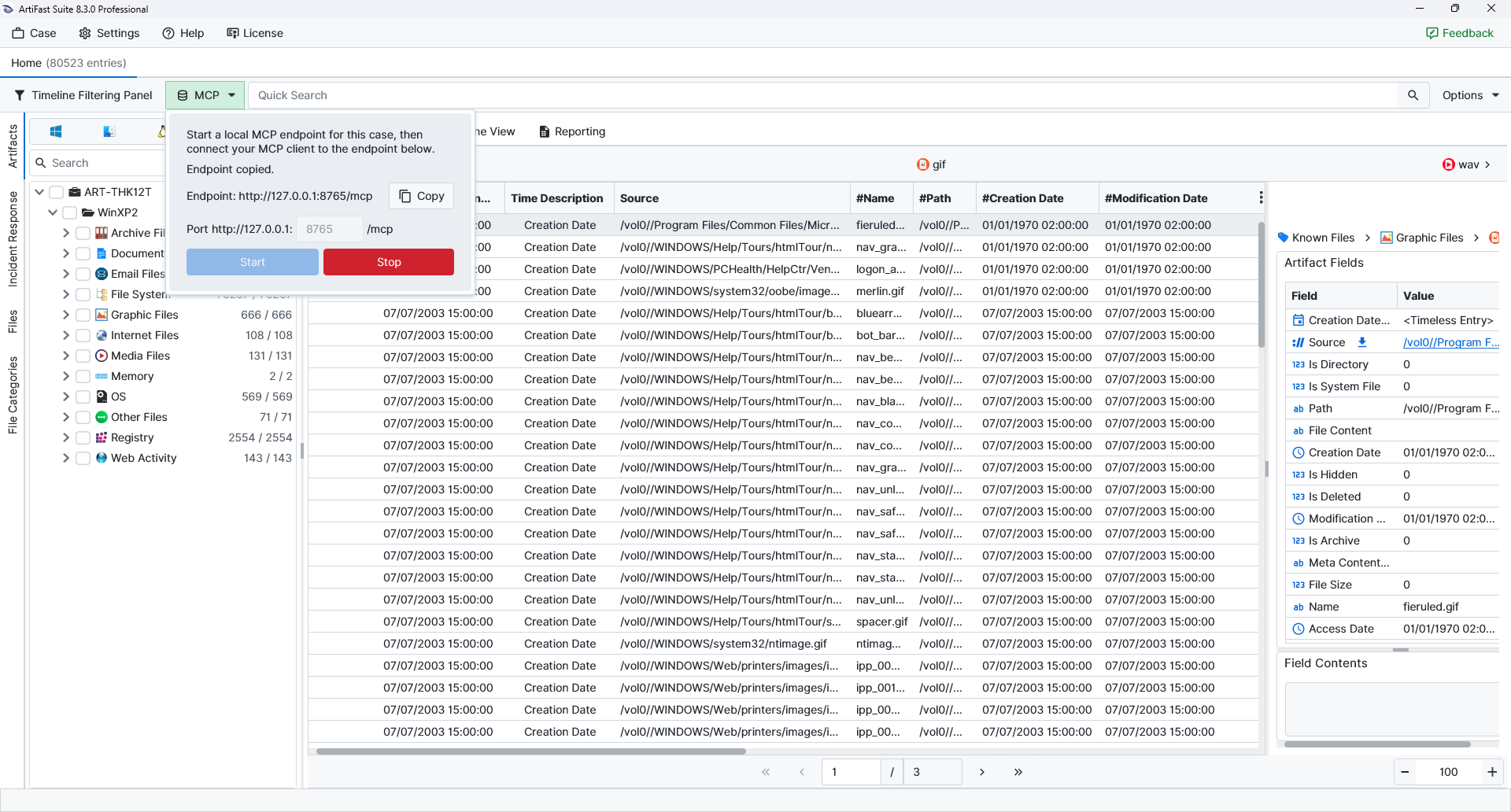
ArtiFast case workspace > MCPWhen the MCP option is opened, a local MCP endpoint can be started for the active case. The endpoint can then be copied and connected to by an MCP client. The feature is focused on active-case review after processing has been completed. Case creation, evidence selection, parser selection, processing, and other pre-processing workflows continue to be handled through the ArtiFast interface.
The ArtiFast MCP server exposes 63 tools for active-case inspection, artifact and timeline review, file inventory access, derived investigation views, bounded exports, and selected annotation actions.
Analyzing ArtiFast MCP Features with ArtiFast
After an ArtiFast case has been created, evidence has been added, and parser processing has completed, the extracted records can be reviewed through Artifact View or Timeline View. With MCP enabled, the same active-case data can also be queried through a local endpoint. This allows case information and selected result sets to be accessed by supported MCP clients while the case remains controlled inside ArtiFast.
×
ArtiFast MCP features extend active-case review by making processed results available through structured, controlled tool calls. This can help investigators and QA teams review case data more consistently, automate selected checks, and connect ArtiFast results with compatible MCP-based workflows.
Active Case and Status
- Case Listing : The active ArtiFast case and loaded evidence can be listed.
- Case Inspection : Case metadata, evidence context, and active-case information can be reviewed.
- MCP Status : MCP server status and active-case context can be checked for troubleshooting.
- Schema Health : Schema, cache health, and result-count information can be inspected.
- Evidence Options : Evidence records available in the active case can be listed.
- Case Overview : Case data, date ranges, top categories, and top artifacts can be summarized.
Artifact Catalog and Definitions
- Artifact Listing : Active-case artifacts can be listed by result-bearing, selected, or supported scope.
- Artifact Search : Artifacts can be searched by artifact name, category, or operating system.
- Artifact Summary : Result counts can be summarized across artifact groups.
- Artifact Context : Artifact definitions, fields, sample rows, related sources, and related file counts can be reviewed.
- Category Results : Categories with results can be listed, summarized, and queried for timeline rows.
- Field Definitions : Artifact field names and definitions can be retrieved for parser-level review.
Timeline Search and Pivoting
- Timeline Lookup : Timeline entries can be retrieved by timeline identifier.
- Artifact Results : Timeline rows associated with a specific artifact can be returned.
- Timeline Search : Timeline data can be searched with text and domain filters.
- Field Value Search : Indexed field values can be searched across active-case data.
- Timeline Pivoting : Nearby rows related to the same artifact, source, or file context can be retrieved.
- DQL Querying : DQL queries can be executed for supported active-case searches.
- Time-Window Summaries : Activity can be summarized by day, hour, or selected time boundaries.
File Inventory and Content Review
- File Search : Loaded file inventory records can be searched by name, path, extension, hash, size, evidence, deleted state, or directory state.
- File Context : File details, parent and child relationships, same-hash files, and related timeline rows can be reviewed.
- Content Slices : Bounded slices of file content can be retrieved as text or base64. Large files are not fully transferred through MCP.
- File Export : Selected files can be exported to the MCP export folder when export workflows are intentionally enabled.
IOC and Derived Investigation Views
- IOC Search : Hashes, paths, file names, domains, URLs, IP addresses, and other indicator values can be searched across timeline, indexed fields, and file metadata.
- IOC Batch Search : Multiple indicator values can be searched in one controlled workflow.
- User Activity : User and SID-focused activity can be summarized when user values are available.
- Windows Event Logons : Windows logon-related event activity can be retrieved for review.
- Browser Activity : Browser-related activity can be summarized from active-case web artifacts.
- Prefetch Entries : Prefetch execution evidence can be reviewed where supported results are present.
- Scheduled Tasks : Scheduled-task activity can be retrieved from Windows task-related artifacts.
- Windows Services : Service-related artifacts can be queried for service configuration and activity review.
- Defender Events : Windows Defender-related event data can be retrieved where supported artifacts are available.
- Amcache and Shimcache : Program execution and application compatibility cache artifacts can be queried.
- USB History : USB device history can be reviewed from supported Windows artifacts.
- BAM and SRUM : Background Activity Moderator and System Resource Usage Monitor data can be retrieved for execution and usage analysis.
- RDP Activity : Remote Desktop-related activity can be reviewed where supported artifacts are present.
Export and Safety Controls
- Bounded Result Exports : Timeline, artifact, and category results can be exported as bounded MCP outputs when export workflows are enabled.
- Export Listing : The active case MCP export directory can be listed.
- Export Cleanup : MCP export cleanup can be used for MCP export files when cleanup is intentionally enabled.
- Notes and Bookmarks : Timeline notes and bookmarks can be set through MCP, but these actions modify the active case.
- Safe Testing Defaults : Read-oriented MCP testing should be separated from export and mutation testing so original evidence and active case data are not unintentionally modified.
For more information or suggestions please contact: enes.cihan@forensafe.com
