Investigating iOS Spotify
24/07/2026 Friday
Spotify is a digital audio streaming application used on iOS devices for
music, podcasts, playlists, and offline listening. When Spotify
application data is available, cache records, offline playlist
references, and preference values may be recovered from the application
container and related iOS storage areas.
Digital Forensics Value of iOS Spotify
iOS Spotify artifacts can provide useful context in investigations where
application usage, media activity, and account-related traces need to be
reviewed. Cached request records may preserve request timestamps,
request keys, and response hash values, which can help show when Spotify
resources were accessed and which remote services or cached objects were
involved. Offline playlist records may help identify playlists retained
for offline access, while preference data may show logout status, token
presence, previously used Spotify and iOS versions, network connectivity
state, and Google Cast error timing. These records can be correlated
with device timeline entries, network artifacts, notifications, and
other application activity to support a clearer reconstruction of user
behavior.
Location of iOS Spotify
iOS Spotify artifacts are commonly stored inside the Spotify application
data container and, in some cases, inside a related PluginKit extension
container. The parsed records may be associated with the following
paths:
/private/var/mobile/Containers/Data/Application/<APP_UUID>/Library/Caches/com.spotify.client/nsurlcache/Cache.db
/private/var/mobile/Containers/Data/PluginKitPlugin/<PLUGIN_UUID>/Library/Caches/com.spotify.client.notification/Cache.db
/private/var/mobile/Containers/Data/Application/<APP_UUID>/Library/Application
Support/Users/<SPOTIFY_USER_ID>-user/offline_lists.bnk
/private/var/mobile/Containers/Data/Application/<APP_UUID>/Library/Preferences/com.spotify.client.plist
The <APP_UUID> and <PLUGIN_UUID> values represent
iOS-assigned container identifiers, and <SPOTIFY_USER_ID>
represents the Spotify user-specific folder name. These values can
differ between devices, backups, and extractions, while the internal
Spotify paths identify the files used for the parsed records.
Analyzing iOS Spotify Artifacts with ArtiFast
This section will discuss how to use ArtiFast to extract iOS Spotify
artifacts from iOS device files and what kind of digital forensics
insights can be gained from the artifacts.
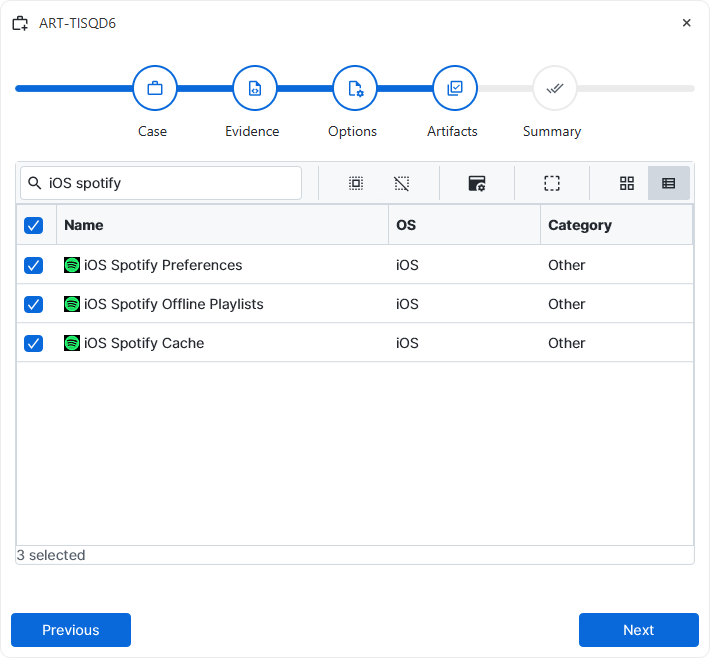
evidence has been added for the investigation, at the Artifact Selection
phase, the iOS Spotify artifact parsers can be selected:
×
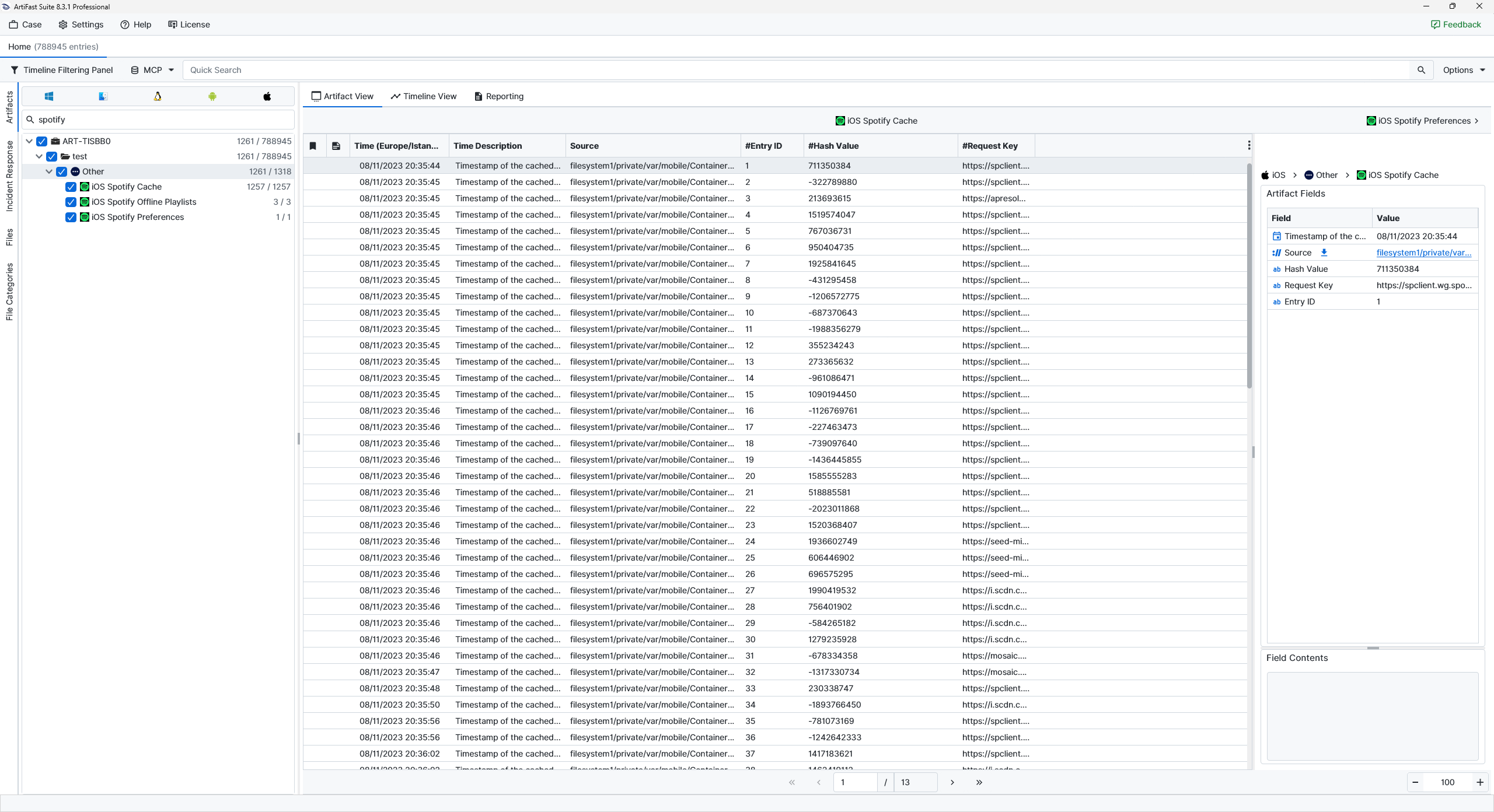
Once ArtiFast parsers plugins complete processing the artifacts for analysis, they can be reviewed via Artifact View or Timeline View, with indexing, filtering, and searching capabilities. Below is a detailed description of iOS Spotify artifacts in ArtiFast.
iOS Spotify Cache
- Date/Time: Marks the time associated with the cached Spotify request.
- Source: Points to the Spotify file from which the record was parsed.
- Entry ID: Provides the internal identifier assigned to the cached entry.
- Hash Value: Stores the hash value calculated for the cached response.
- Request Key: Contains the request key or URL reference tied to the cached Spotify resource.
iOS Spotify Offline Playlists
- Source: Points to the Spotify file from which the record was parsed.
- Offline Playlist URI: Preserves the Spotify playlist URI retained for offline access.
iOS Spotify Preferences
- Last Google Cast Error Time: Records the last Google Cast error time retained in Spotify preferences.
- Source: Points to the Spotify file from which the record was parsed.
- User Logged Out: Indicates the logout state saved by Spotify.
- Client Token: Contains the encrypted client token retained by the application.
- Previous Spotify Version: Records the Spotify version previously used on the device.
- Previous iOS Version: Records the iOS version previously associated with Spotify use.
- Network Connectivity: Describes whether network connectivity was available when the value was stored.
For more information or suggestions please contact: enes.cihan@forensafe.com
