Investigating iOS SplitWise
17/07/2026 Friday
SplitWise is an expense-sharing application used to manage shared costs,
group expenses, balances, and settlement-related records. On iOS
devices, SplitWise data may be stored inside the application data
container and can include users, groups, expenses, notifications, and
balance information when the related application database is
available.
Digital Forensics Value of iOS SplitWise
iOS SplitWise artifacts can be valuable in investigations because
financial records, shared expenses, and group relationships may be
preserved together in one application database. Expense descriptions,
payer details, member names, email addresses, phone numbers, group
names, balances, currencies, notifications, and timestamps can be used
to understand who was connected to whom, what shared costs were
recorded, and when the activity was created or updated. These records
may help reconstruct social or financial events such as meals, trips,
household expenses, reimbursements, or group settlements. Even when a
direct payment transaction is not recovered, SplitWise data can provide
important context about relationships, obligations, and user activity,
and it can be correlated with messages, contacts, location history,
banking records, and other mobile timeline evidence.
Location of iOS SplitWise
iOS SplitWise artifacts are commonly stored in the SplitWise application
support database inside the iOS application data container. The artifact
location is typically associated with the following path:
/private/var/mobile/Containers/Data/Application/<APP_GUID>>/Library/Application
Support/database.sqlite
The <APP_GUID> value represents the unique application data
container identifier assigned by iOS. This value may differ across
devices, backups, and extractions, whereas the internal
Library/Application Support/database.sqlite path identifies the
SplitWise database location used for parsed records.
Analyzing iOS SplitWise Artifacts with ArtiFast
This section will discuss how to use ArtiFast to extract iOS SplitWise
artifacts from iOS device files and what kind of digital forensics
insights can be gained from the artifacts.
After a case has been created and evidence has been added for the
investigation, at the Artifact Selection phase, the iOS SplitWise
artifact parsers can be selected:
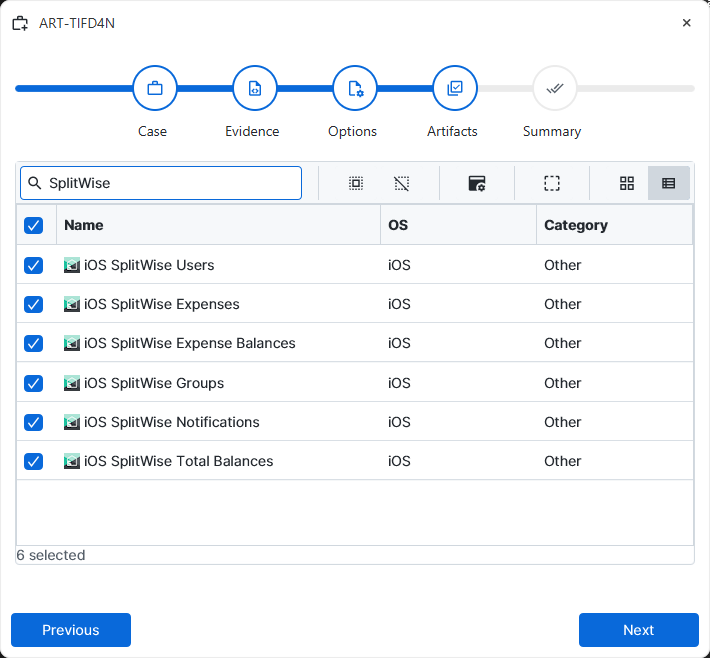
×
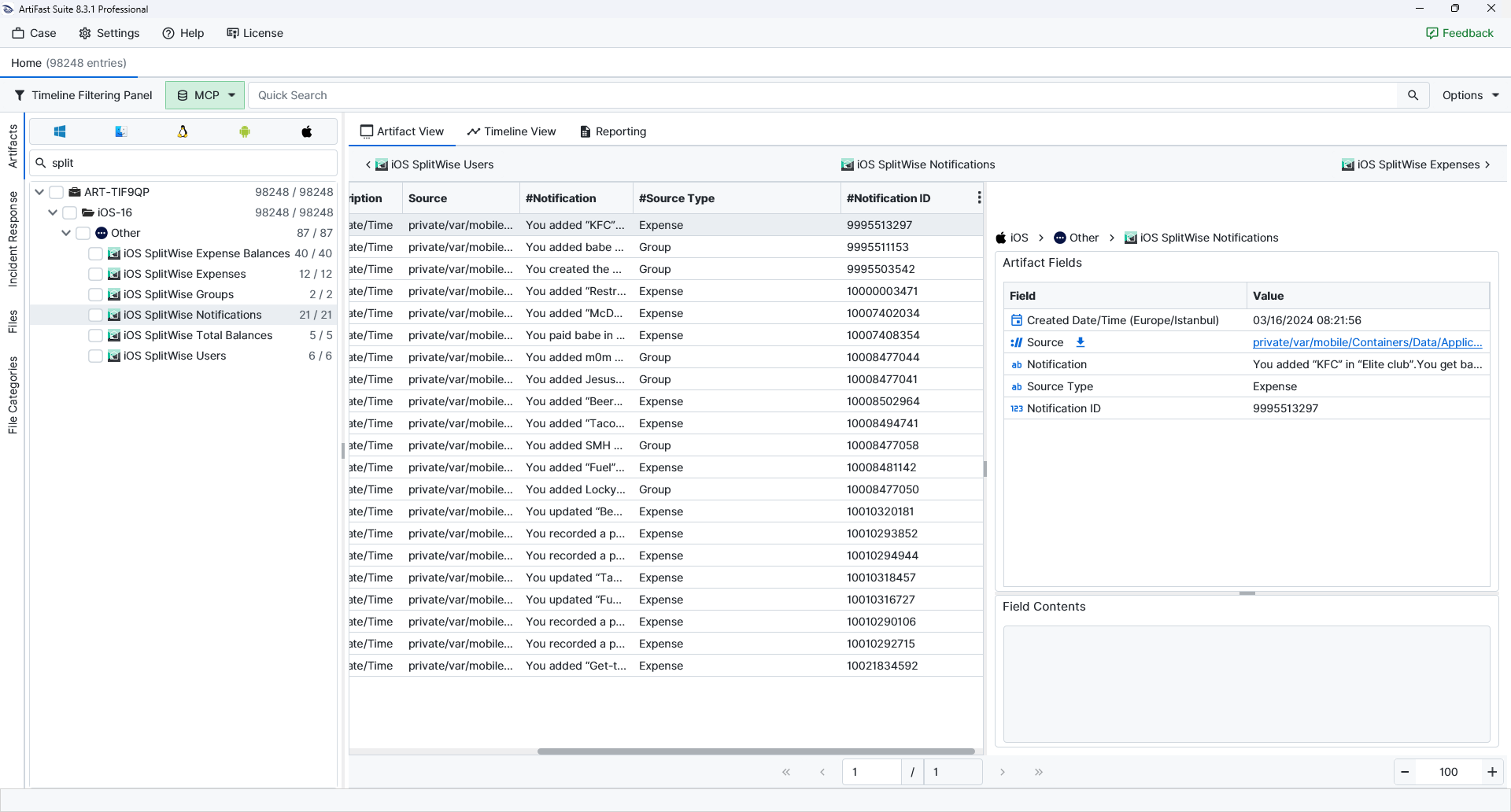
Once ArtiFast parsers plugins complete processing the artifacts for analysis, they can be reviewed via Artifact View or Timeline View, with indexing, filtering, and searching capabilities. Below is a detailed description of iOS SplitWise artifacts in ArtiFast.
iOS SplitWise Expense Balances
- Created Date/Time: Records when the parsed SplitWise entry was created.
- Source: Points to the SplitWise database file used as the source for the parsed entry.
- Description: Stores the expense label or activity description saved in SplitWise.
- Owed Share: Represents the portion of an expense assigned to that member.
- Member Name: Identifies the SplitWise member linked to the expense balance.
- Email Address: Lists the email address tied to the SplitWise member or friend record.
- Paid Share: Represents the amount contributed by that member toward the expense.
iOS SplitWise Expenses
- Created Date/Time: Records when the parsed SplitWise entry was created.
- Source: Points to the SplitWise database file used as the source for the parsed entry.
- Cost: Stores the total amount recorded for the expense.
- Description: Stores the expense label or activity description saved in SplitWise.
- Group Name: Identifies the SplitWise group connected to the expense or group record.
- Category: Describes the expense category selected in SplitWise.
- Payer: Names the person recorded as paying the expense.
- Currency: Records the currency associated with the related financial value.
- Expense GUID: Preserves the globally unique identifier tied to the expense entry.
- Expense ID: Provides the internal SplitWise identifier for the expense record.
- Updated Date/Time: Records when the entry was last updated in SplitWise.
iOS SplitWise Groups
- Created Date/Time: Records when the parsed SplitWise entry was created.
- Source: Points to the SplitWise database file used as the source for the parsed entry.
- Group ID: Provides the internal identifier assigned to the SplitWise group.
- Cover Photo URL: References the online cover photo URL associated with the group.
- Members: Lists the members associated with the group.
- Whiteboard: Contains group whiteboard text or notes.
- Invite Link: Stores any invite link retained for the SplitWise group.
- Avatar URL: References the online avatar image URL associated with the group.
- Group Type: Describes the group type recorded by SplitWise.
- Updated Date/Time: Records when the entry was last updated in SplitWise.
- Group Name: Identifies the SplitWise group connected to the expense or group record.
iOS SplitWise Notifications
- Created Date/Time: Records when the parsed SplitWise entry was created.
- Source: Points to the SplitWise database file used as the source for the parsed entry.
- Notification: Contains the SplitWise notification text recovered from the database.
- Source Type: Classifies the notification source, such as expense or group activity.
- Notification ID: Provides the internal identifier assigned to the notification.
iOS SplitWise Total Balances
- Created Date/Time: Records when the parsed SplitWise entry was created.
- Source: Points to the SplitWise database file used as the source for the parsed entry.
- Email Address: Lists the email address tied to the SplitWise member or friend record.
- Friend Name: Identifies the friend associated with the balance entry.
- Updated Date/Time: Records when the entry was last updated in SplitWise.
- Currency: Records the currency associated with the related financial value.
- Balance: Records the total balance amount calculated for the SplitWise friend.
iOS SplitWise Users
- Created Date/Time: Records when the parsed SplitWise entry was created.
- Source: Points to the SplitWise database file used as the source for the parsed entry.
- Registration Status: Indicates the account registration state recorded for the user.
- Country: Records the country code linked to the SplitWise user profile.
- Last Name: Stores the last name saved for the SplitWise user.
- Currency: Records the currency associated with the related financial value.
- Person ID: Provides the internal SplitWise identifier for the user profile.
- First Name: Stores the first name saved for the SplitWise user.
- Avatar Path: References the stored avatar image path associated with the user.
- Phone Number: Records any phone number associated with the SplitWise member.
- Updated Date/Time: Records when the entry was last updated in SplitWise.
- Email Address: Lists the email address tied to the SplitWise member or friend record.
For more information or suggestions please contact: asli.beyhan@forensafe.com
