iOS MeWe
27/03/2026 Friday
iOS MeWe artifacts are used to present account, communication, and profile data that are maintained by the MeWe application on the device. Information related to account configuration, chat messages, contacts, cookies, draft messages, posts, and user profiles is stored within the application’s sandbox and is exposed through these artifacts in a structured form. Across this artifact set, values such as activity timestamps, user and post identifiers, profile details, message content, cookie metadata, contact relationships, and account-related settings are recorded. In this way, the use of the MeWe application on the device can be examined through a combination of account, messaging, social, and application-state records.
Digital Forensics Value of iOS MeWe
The digital forensics value of iOS MeWe artifacts is derived from the
way account activity, social interactions, and application-state data
are preserved by the application. Account information can be used to
assess login state, subscription status, locale settings, device tokens,
and recent activity. Chat messages, draft messages, and posts can be
used to reconstruct communication and content-sharing activity, while
contact and user records can be used to associate identifiers with
profile names, usernames, and relationship data. Cookie records can be
used to show session-related information and validity periods. When
these artifacts are correlated with one another, timelines of account
use, communication, profile interaction, posting behavior, and
application access can be supported or challenged with greater
confidence.
Location of iOS MeWe Artifacts
For this artifact set, MeWe data is obtained from files stored inside
the application’s sandbox container on the device. The exact application
container directory is assigned dynamically by iOS and is represented by
a UUID-style value. The data exists in these paths:
/private/var/mobile/Containers/Data/Application/<MeWe_UUID>/Library/Preferences/com.mewe.plist
/private/var/mobile/Containers/Data/Application/<MeWe_UUID>/Documents/sgrouplesdb.sqlite
/private/var/mobile/Containers/Data/Application/<MeWe_UUID>/Library/Cookies/Cookies.binarycookies
Analyzing iOS MeWe Artifacts with ArtiFast
This section will discuss how to use ArtiFast to extract iOS MeWe
artifacts from iOS devices’ files and what kind of digital forensics
insights we can gain from the artifacts.
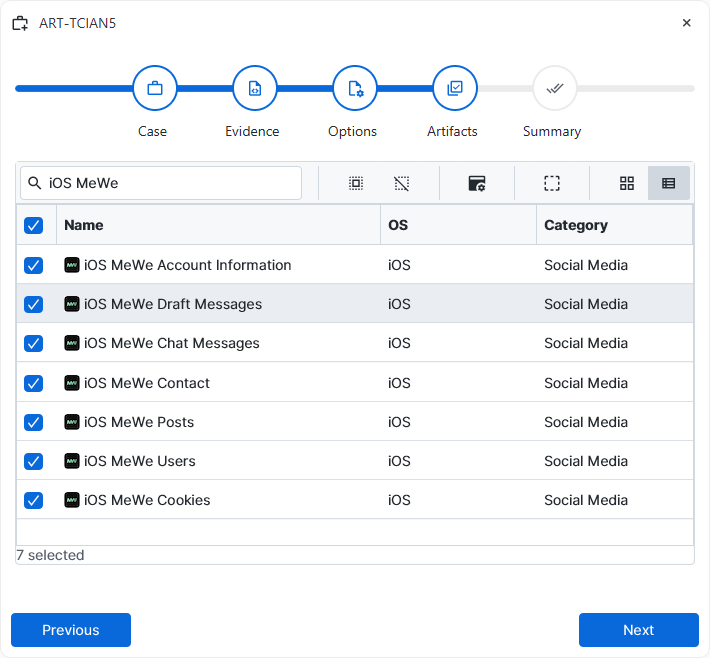
After you have created your case and added evidence for the
investigation, at the Artifact Selection phase, you can select iOS MeWe
artifact parsers:
×
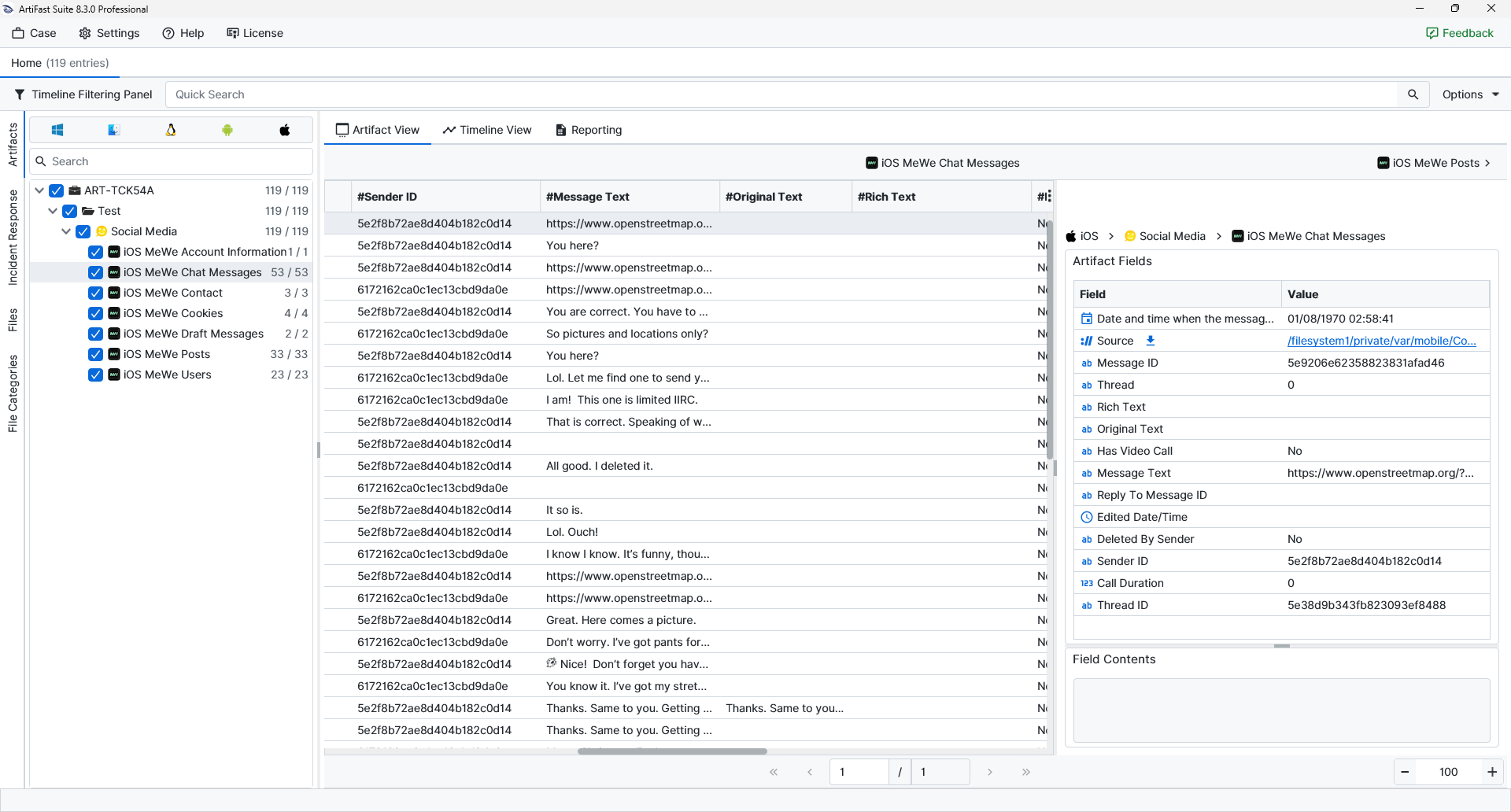
Once ArtiFast parsers plugins complete processing the artifact for analysis, it can be reviewed via “Artifact View” or “Timeline View,” with indexing, filtering, and searching capabilities. Below is a detailed description of iOS MeWe artifacts in ArtiFast.
iOS MeWe – Account Information
- Just Logged In : The current login-state flag is shown here and can be used to indicate whether a recent login was recorded.
- Show Welcome Screen : The application-state flag that controls whether the welcome screen should be shown is shown here.
- App Launch Count : The number of times the application was launched.
- Recently Used Emojis : The emoji values most recently used by the account.
- APNs Device Token (VoIP) : The Apple Push Notification token associated with VoIP functionality is shown here.
- Premium Reactivated : The state indicating whether a premium subscription or feature was reactivated.
- Seen Feature Hints : The feature-hint values already displayed to the user.
- No Rating Received : The rating-prompt state is shown here and can indicate whether a rating event was not received.
- Journals Subscription Expiration : The expiration time associated with the Journals subscription.
- Locale Identifier : The locale value used by the application, such as en_US.
- Rating Banner Launch Date : The time at which the rating banner was launched or first shown is shown here.
- Installation ID : The application installation identifier assigned to this MeWe installation.
- Premium Subscription Expiration : The premium-subscription expiration state or time.
- APNs Device Token : The standard Apple Push Notification token associated with the application is shown here.
iOS MeWe – Chat Messages
- Message ID : The unique identifier assigned to the message.
- Thread : The thread value associated with the message is shown here.
- Rich Text : The rich-text representation of the message.
- Original Text : The unedited or original message text.
- Has Video Call : The flag indicating whether the message record is associated with a video-call event.
- Message Text : The visible text content of the message is shown here.
- Reply To Message ID : The identifier of the message to which a reply was made is shown here.
- Edited Date/Time : The time at which the message was edited.
- Deleted By Sender : The deletion-state flag indicating whether the sender removed the message.
- Sender ID : The identifier of the sending user.
- Call Duration : The duration associated with a call-related message record.
- Thread ID : The identifier of the conversation thread containing the message.
iOS MeWe – Contact
- Contact Type : The type assigned to the contact record is shown here.
- Team ID : The identifier of the team associated with the contact.
- Can Invite Members : The flag indicating whether the contact can invite members.
- Team Name : The team name associated with the contact record.
- Can Invite Guests : The flag indicating whether guest invitations are allowed.
- Contact ID : The identifier assigned to the contact.
- Invited : The state indicating whether an invitation was sent.
- Group ID : The group identifier associated with the contact record.
- Online : The presence state associated with the contact.
- Member User ID : The identifier of the member user associated with the contact or team entry.
- Confirmed : The confirmation state of the contact for the invitation.
- Inviter User ID : The identifier of the user who issued the invitation.
- Invitation Type : The type of invitation associated with the contact.
- Inviter Name : The name of the user who issued the invitation.
- Team Role : The role assigned to the user within the team context is shown here.
iOS MeWe – Cookies
- Is Secure : The flag indicating whether the cookie is marked as secure.
- Is Http Only : The flag indicating whether the cookie is marked as HTTP-only.
- Expiration Date : The time at which the cookie is set to expire is shown here.
- Path : The cookie path value that determines the URL scope of the cookie.
- URL : The domain or URL associated with the cookie is shown here.
- Name : The cookie name.
- Value : The cookie value stored by the application.
iOS MeWe – Draft Messages
- Draft Text : The unsent text preserved in the draft.
- Draft ID : The identifier assigned to the draft record.
iOS MeWe – Posts
- Edited Date/Time : The time at which the post was edited.
- Photos Count : The number of photos attached to the post.
- Posted By Page : The flag indicating whether the post was published by a page rather than a personal account.
- Updated Date/Time : The time at which the post record was updated.
- Author ID : The identifier of the user or page that created the post.
- Comments Count : The number of comments associated with the post.
- Post ID : The unique identifier assigned to the post.
- Shares Count : The number of shares associated with the post.
- Post Text : The visible body text of the post is shown here.
- Shared With Everyone : The sharing-state flag indicates whether the post was shared with everyone.
- Is Public : The visibility flag indicating whether the post was public.
- For Close Friends : The flag indicating whether the post was limited to a close-friends audience.
iOS MeWe – Users
- Contacts Count : The number of contacts associated with the user profile.
- Followers Count : The number of followers associated with the user profile.
- Avatar URL : The avatar reference or avatar-related value associated with the profile.
- Profile Description : The profile-description text associated with the user.
- Is Premium : The flag indicating whether the user account is premium.
- User ID : The unique identifier assigned to the MeWe user.
- Last Name : The last name stored in the user profile is shown here.
- Username : The username associated with the user profile is shown here.
- First Name : The first name stored in the user profile is shown here.
- Is Verified : The verification-state flag associated with the user profile.
- Full Name : The full display name of the user.
- Is Public : The visibility-state flag indicating whether the profile is public or not.
- Posts Count : The number of posts associated with the user profile.
- Following Count : The number of other users or profiles followed by the account is shown here.
- DB Row ID : The internal database row identifier assigned to the record is shown here.
For more information or suggestions please contact: ali.tora@forensafe.com
