iOS Geolocation
13/02/2025 Friday
iOS Geolocation artifacts are used to present data that is maintained by
the system location and mapping services on the device. Activity
generated by applications that request location data, download map
tiles, or resolve place information is recorded in Apple’s geolocation
caches and databases, and is later exposed through these artifacts as
time-stamped entries with application identifiers, tile and place keys,
and related metadata.
Digital Forensics Value of iOS Geolocation
The digital forensics value of iOS Geolocation artifacts is derived from
the way location-related activity is passively recorded by the operating
system. Timestamps associated with application usage, map-tile
retrieval, and place-cache entries can be used to infer when
location-aware apps were active, when map views were opened, and when
specific areas or addresses were recently looked up. Application
identifiers and request keys allow these records to be associated with
particular apps or services, while cached place strings and tile
metadata can suggest approximate regions of interest even when precise
GPS tracks or navigation histories are unavailable or have been removed.
When these artifacts are correlated with other evidence—such as message
logs, photos, system logs, or known travel events—patterns of movement,
planning, or area familiarity can be supported or challenged, and the
presence of location-based activity at key times can be demonstrated.
Location of iOS Geolocation Artifacts
For this artifact set, geolocation-related data is obtained from SQLite
databases maintained by the com.apple.geod (GeoServices) subsystem in
the device caches.
Application-level geolocation usage, Cached map-title information, and
Cached place objects have been observed in:
/private/var/mobile/Library/Caches/com.apple.geod/AP.db
/private/var/mobile/Library/Caches/com.apple.geod/MapTiles/MapTiles.sqlitedb
/private/var/mobile/Library/Caches/com.apple.geod/PDPlaceCache.db
These databases are stored in the user’s cache area and are created and
updated automatically as location-aware applications, Apple Maps, and
other GeoServices clients are used on the device.
Analyzing iOS Geolocation Artifact with ArtiFast
This section will discuss how to use ArtiFast to extract iOS Geolocation
artifacts from iOS devices’ files and what kind of digital forensics
insights we can gain from the artifacts.
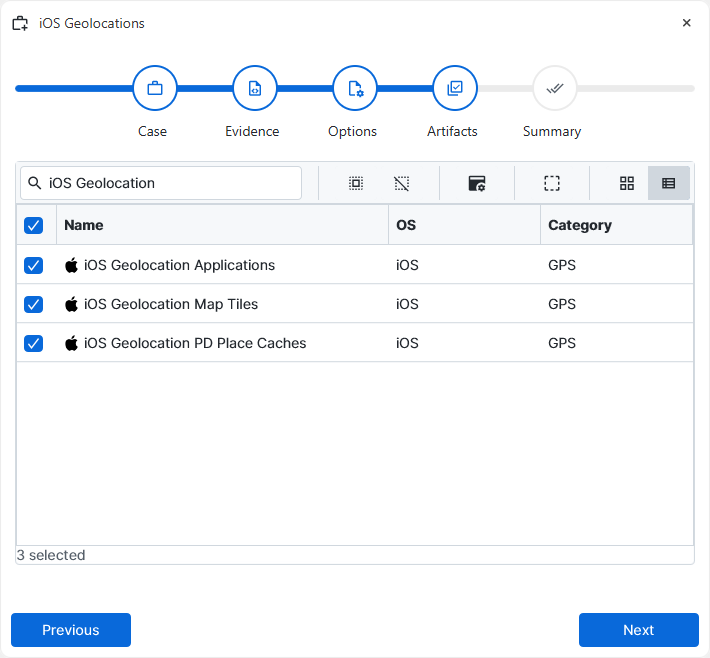
After you have created your case and added evidence for the
investigation, at the Artifact Selection phase, you can select iOS
Geolocation artifact parsers:
×
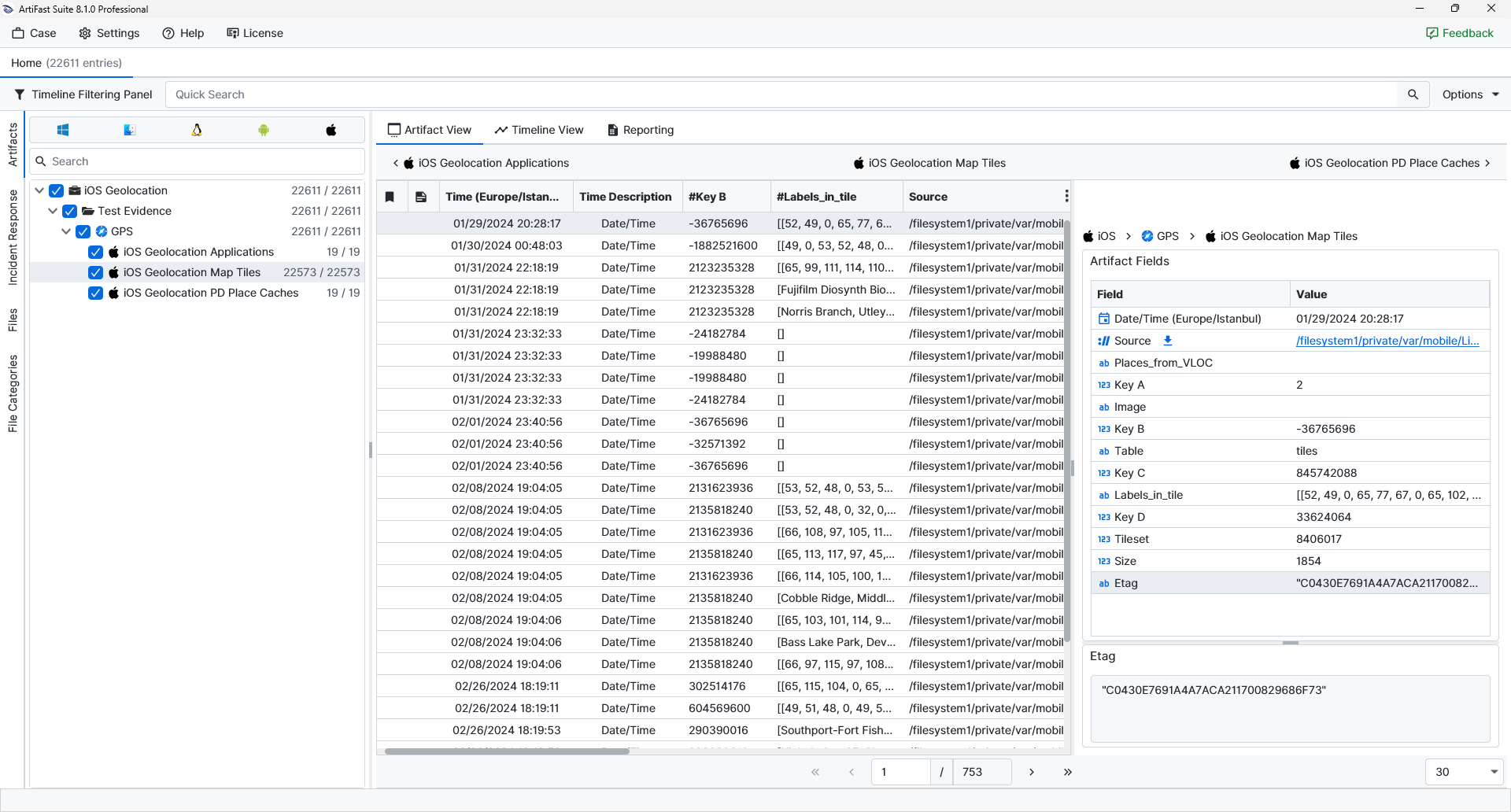
Once ArtiFast parsers plugins complete processing the artifact for analysis, it can be reviewed via “Artifact View” or “Timeline View,” with indexing, filtering, and searching capabilities. Below is a detailed description of iOS Geolocation artifacts in ArtiFast.
iOS Geolocation Applications
- Count Type: The numeric value representing the internal usage/count category assigned by the GeoServices database.
- Application ID: The bundle identifier of the application associated with the geolocation usage record.
- Table: The name of the database table from which the entry was obtained.
iOS Geolocation Map Tiles
- Places_from_VLOC: A flag or value indicating whether the tile entry is associated with place information obtained from VLOC (location services).
- Key A / Key B / Key C / Key D: Internal numeric keys used by the GeoServices database to reference the tile.
- Image: A flag or reference indicating that the record corresponds to an image tile.
- Table: The name of the database table from which the record was obtained.
- Labels_in_tile: Encoded label information associated with the tile (such as road or place labels rendered within the tile) recorded as a structured list.
- Tileset: The numeric identifier of the tileset to which the tile belongs.
- Size: The size of the cached tile data in bytes.
- Etag: The entity tag or cache validator associated with the tile, as used by the network/cache system.
iOS Geolocation PD Place Caches
- PD Place Hash: The hashed identifier associated with the cached place object, used internally by the GeoServices subsystem to reference the place.
- Expires Date/Time: The date and time at which the cached place entry is scheduled to expire, indicating how long the entry is intended to remain valid.
- Request Key: The request key associated with the place lookup (for example, a token representing the original query or client).
- PD Place: A serialized or partially human-readable representation of the place object, which may include address components, locale information, and other metadata describing the resolved location.
For more information or suggestions please contact: ali.tora@forensafe.com
