iOS Bumble
26/12/2025 Friday
iOS Bumble artifacts are used to record messaging activity and basic account details for the Bumble application within its sandbox on the device. For messages, the creation time of each message, its direction (incoming or outgoing), its read state, the last modified timestamp, the sender and receiver identifiers, and the message content are stored. For the account, the Bumble display name, an internal user identifier, the last known location coordinates (latitude and longitude), the timestamp of that location update, and the installed app version are recorded. In this way, the configuration of a Bumble account and its use for communication on the device can be reconstructed from the stored records.
Digital Forensics Value of iOS Bumble
The digital forensics value of iOS Bumble artifacts is derived from the way conversations and account details are preserved on the device. Message creation times, modified timestamps, and message direction values are used to reconstruct the order and flow of communication, while the read state indicates whether a message was viewed. Sender and receiver identifiers allow exchanges to be associated with particular Bumble accounts or profiles, even when display names are changed.
For the account, the stored user name, internal user ID, last known location coordinates, and the timestamp of that location update provide context about who was using the app, where the device was located when Bumble was last active, and which version of the application was installed. When these artifacts are correlated with other messaging, location, or system logs, timelines of contact, potential meetings, or movements can be supported or challenged, and the device can be more confidently linked to specific Bumble activity.
Location of iOS Bumble Artifacts
For this artifact, Bumble data is obtained from two SQLite databases stored inside the application’s sandbox container. The primary application database, which contains account details and other core data, is stored at:
/private/var/mobile/Containers/Data/Application/<Bumble_UUID>/Documents/yap-database.sqlite
Message content and related chat metadata are stored in a separate cache database located at:
/private/var/mobile/Containers/Data/Application/<Bumble_UUID>/Library/Caches/Chat.sqliteAnalyzing iOS Bumble Artifact with ArtiFast
This section will discuss how to use ArtiFast to extract iOS Bumble artifacts from iOS devices and what kind of digital forensics insights we can gain from the artifacts.
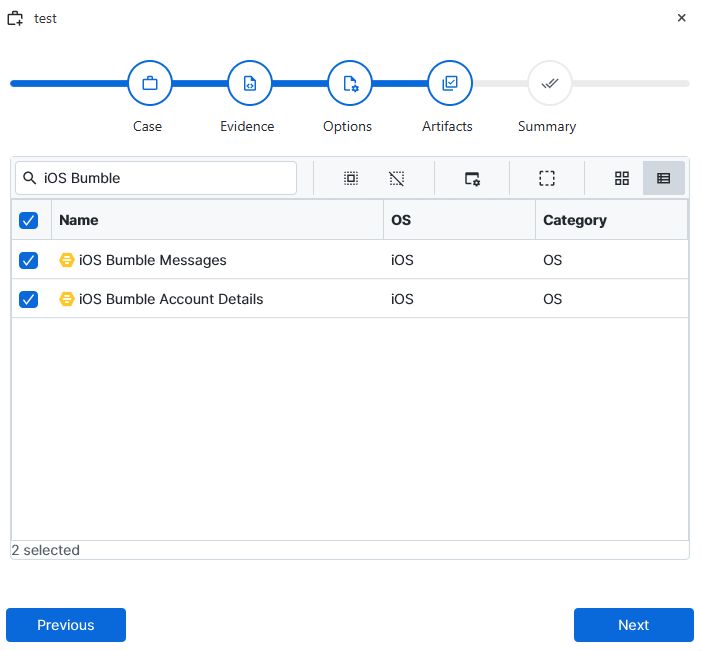
After you have created your case and added evidence for the investigation, at the Artifact Selection phase, you can select iOS Bumble artifact parser:
×
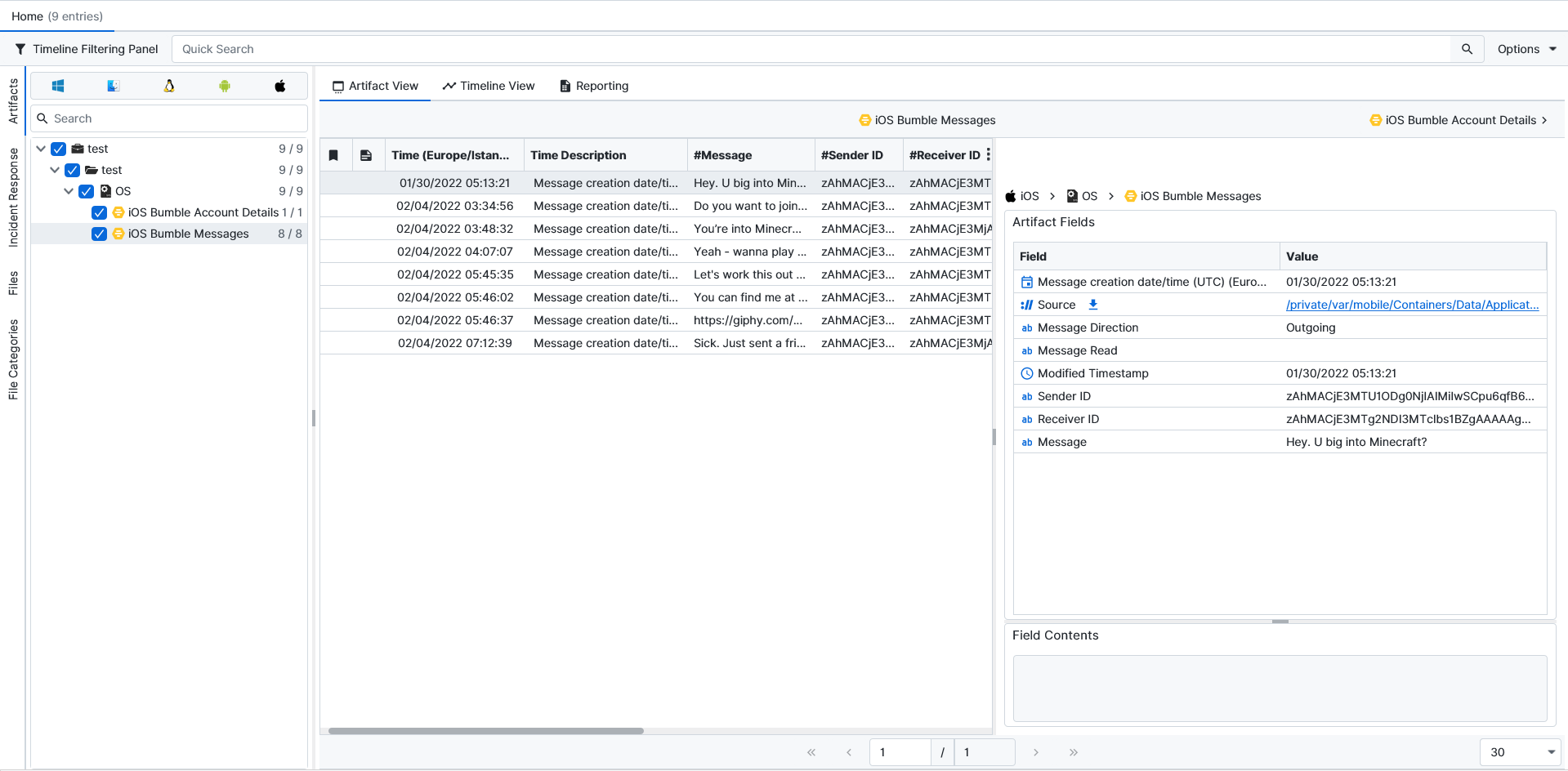
Once ArtiFast parsers plugins complete processing the artifact for analysis, it can be reviewed via “Artifact View” or “Timeline View,” with indexing, filtering, and searching capabilities. Below is a detailed description of iOS Bumble artifacts in ArtiFast.
iOS Bumble Account Details
- Message Direction: The direction of the message (incoming or outgoing) is indicated here.
- Message Read: The read status of the message is recorded in this field, indicating whether the message has been viewed.
- Modified Timestamp: The last time at which the message record was modified in the database is stored here.
- Sender ID: The internal Bumble identifier for the account that sent the message is recorded in this field.
- Receiver ID: The internal Bumble identifier for the account that received the message is recorded here.
- Message: The body text of the message, as stored by Bumble, is shown in this field.
iOS Bumble Account Details
- Message Direction: The direction of the message (incoming or outgoing) is indicated here.
- Message Read: The read status of the message is recorded in this field, indicating whether the message has been viewed.
- Modified Timestamp: The last time at which the message record was modified in the database is stored here.
- Sender ID: The internal Bumble identifier for the account that sent the message is recorded in this field.
- Receiver ID: The internal Bumble identifier for the account that received the message is recorded here.
- Message: The body text of the message, as stored by Bumble, is shown in this field.
For more information or suggestions please contact: ali.tora@forensafe.com
