Apple Wallet
09/10/2026 Friday
Apple Wallet is Apple's built-in application for keeping payment cards,
boarding passes, event tickets, transit cards, loyalty cards, and
supported digital keys in one place. Items can be added through Wallet,
an issuer's application, a website, or an email, after which the pass
can be displayed when needed and updated by its issuer.
Digital Forensics Value of Apple Wallet
From a forensic perspective, Apple Wallet can provide an inventory of
passes and cards together with identifiers, issuing organizations,
display data, update times, and supported payment functions. Transaction
records may add a merchant label, amount, currency, status, type,
timestamp, and location metadata. The Pass ID and serial number can be
used to connect the detailed pass, transaction, and unique-card views,
allowing Wallet activity to be examined as a timeline rather than as
isolated records.
Location of Apple Wallet Artifacts
Apple Wallet artifacts are stored in the following locations:
/private/var/mobile/Library/Passes/passes23.sqlite
/private/var/mobile/Library/Passes/Cards/<PASS_ID>.pkpass/pass.json
/System/Library/PrivateFrameworks/PassKitCore.framework/accessPassTemplate/pass.json
/System/Library/PrivateFrameworks/HomeKitDaemon.framework/HomeKey-Wallet.pass/pass.json
/System/Library/PrivateFrameworks/HomeKitDaemonLegacy.framework/HomeKey-Wallet.pass/pass.json
Analyzing Apple Wallet Artifacts with ArtiFast
This section will discuss how to use ArtiFast to extract Apple Wallet
artifacts from Apple device files and what kind of digital forensics
insights can be gained from the artifacts.
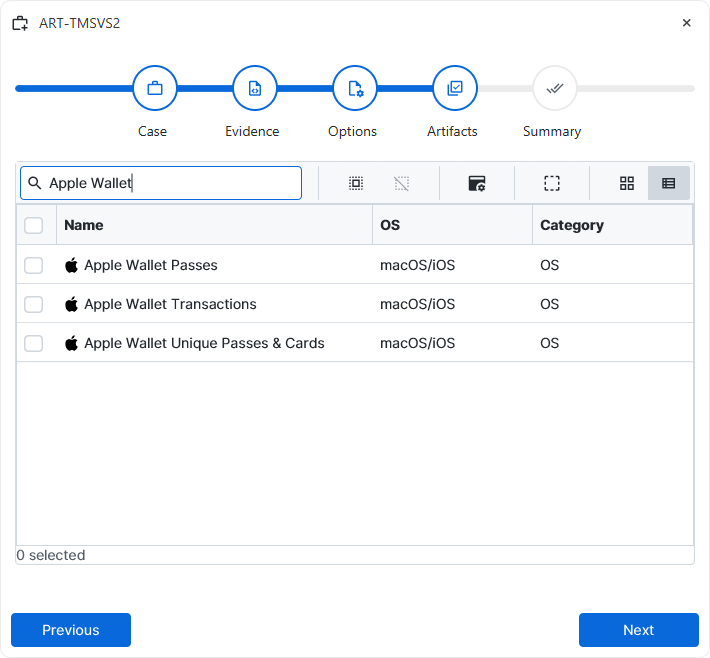
After a case has been created and evidence has been added for the
investigation, at the Artifact Selection phase, the Apple Wallet
artifact parsers can be selected:
×
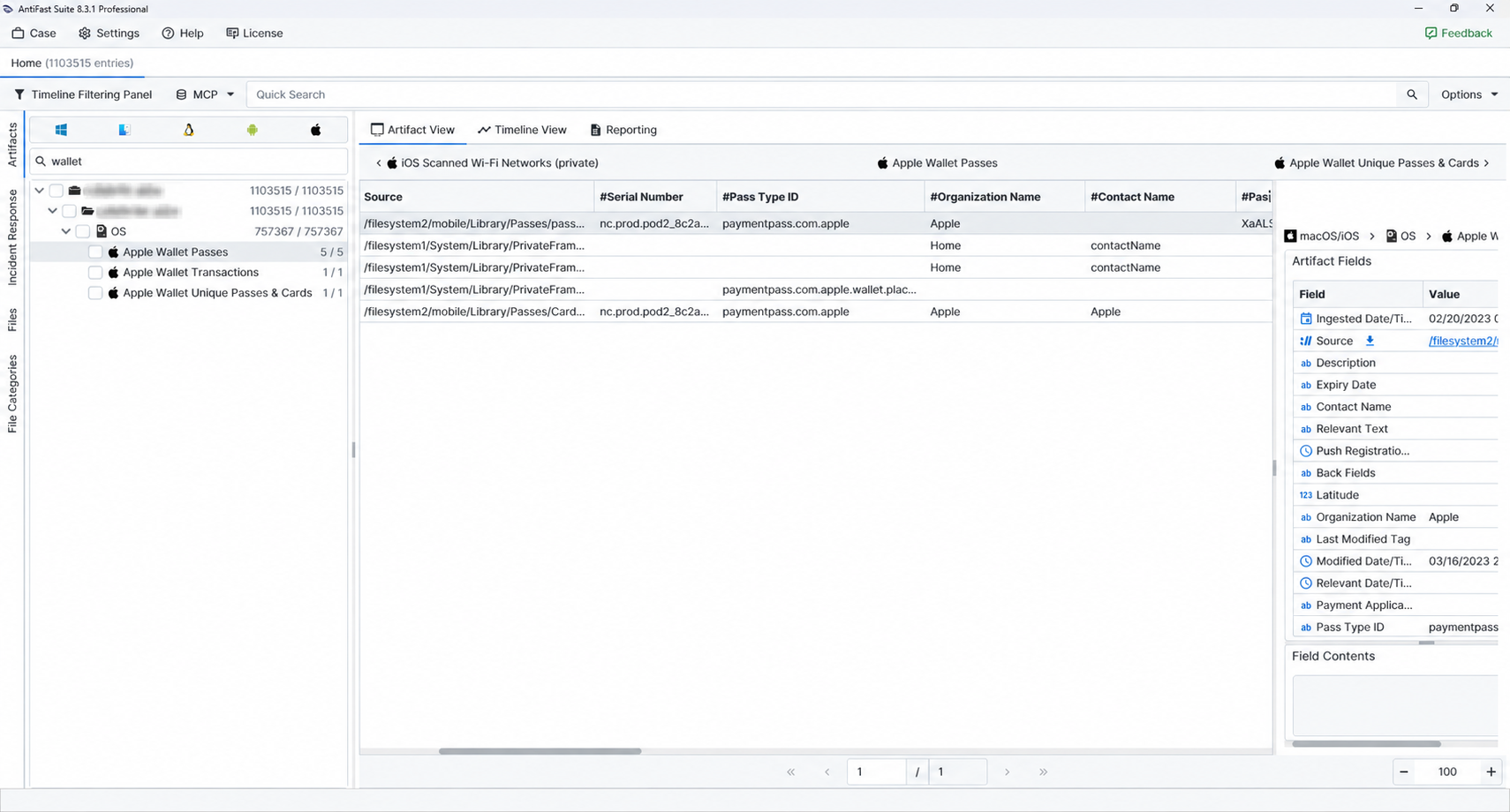
Once the ArtiFast parser plugins complete processing the artifacts for analysis, they can be reviewed via Artifact View or Timeline View, with indexing, filtering, and searching capabilities. Below is a detailed description of Apple Wallet artifacts in ArtiFast.
Apple Wallet Passes
- Ingested Date/Time: The time associated with the pass entering the local Wallet store.
- Serial Number: The serial value assigned to the pass or card instance.
- Pass Type ID: The identifier that associates the pass with its issuing pass type.
- Organization Name: The organization named as the pass issuer or provider.
- Contact Name: A contact label stored in the pass definition.
- Pass ID: Wallet's identifier for the pass.
- Issuer Country Code: The country code recorded for the issuer.
- Description: The human-readable description supplied for the pass.
- Primary Fields: Structured content intended for the main area of the pass.
- Secondary Fields: Supporting display content stored beneath the primary fields.
- Relevant Text: Contextual text that may be presented when the pass becomes relevant.
- Modified Date/Time: The last modification time retained for the pass.
- Relevant Date/Time: The date or time when the pass is intended to become relevant.
- Push Registration Date/Time: The time associated with registration for issuer-driven pass updates.
- Expiry Date: The expiration value supplied for the pass.
- Back Fields: Additional information intended for the reverse or information view of the pass.
- Payment Applications: Secure-element or payment-application details, including supported capabilities and network information.
- Auxiliary Payment Applications: Supplemental payment applications associated with the pass.
- Latitude: The latitude attached to the pass's relevance metadata.
- Longitude: The corresponding longitude attached to the pass's relevance metadata.
- Last Modified Tag: A version or synchronization marker used when the pass is updated.
Apple Wallet Transactions
- Transaction Date/Time: The timestamp associated with the transaction record.
- Serial Number: The serial number of the related pass or card.
- Merchant Name: The merchant or service label stored with the entry.
- Amount: The numeric amount recorded for the transaction.
- Currency Code: The currency code paired with the amount.
- ID: The internal identifier assigned to the transaction.
- Organization Name: The organization associated with the related pass or payment service.
- Pass ID: A Wallet identifier that can connect the transaction to a pass or card record.
- Peer Payment Handle: The account handle retained for a person-to-person payment.
- Peer Payment Memo: The note stored with a peer payment.
- Ingested Date/Time: The time the transaction was added to the local Wallet data.
- Modified Date/Time: The last modification time retained for the transaction.
- Locality: The city or locality recorded with transaction location data.
- Administrative Area: The state, province, or comparable administrative region.
- Transaction Status: Wallet's stored status value.
- Transaction Type: Wallet's stored transaction classification.
- Horizontal Accuracy: The estimated horizontal uncertainty of the recorded coordinates.
- Vertical Accuracy: The estimated vertical uncertainty of the altitude value.
- Latitude: The transaction-related latitude when a valid location was retained.
- Longitude: The corresponding transaction-related longitude.
- Altitude: The elevation value associated with the recorded location.
- Merchant Industry Category: The category retained for the merchant's business type.
- Location Date/Time: The timestamp associated with the location measurement.
Apple Wallet Unique Passes & Cards
- Serial Number: The issuer or Wallet serial value for the pass or card.
- ID: An internal identifier retained for the item.
- Organization Name: The organization associated with the item.
- Pass ID: The Wallet identifier used to link the item with related pass data.
- Modified Date/Time: The latest modification time recorded for the item.
- Relevant Date/Time: The date or time when the item was expected to become contextually relevant.
- Push Registration Date/Time: The time associated with registration for remote pass updates.
- Last Modified Tag: A synchronization or version marker for the latest known pass state.
For more information or suggestions please contact: enes.turan@forensafe.com
