Apple Spotlight
13/03/2026 Friday
Apple Spotlight artifacts are used to present metadata that has been
indexed by Apple’s Spotlight search framework for system and application
content on the device. Information from Core Spotlight stores is
recorded as searchable entries containing timestamps, bundle
identifiers, domain identifiers, content-type values, external and
internal IDs, titles, recipients, locations, calendar-related data, and
many other descriptive properties depending on the indexed item. In this
way, content that has been made searchable by the operating system—such
as calendar events, messages, mail-related items, app content, and other
user or system data—can be examined through a structured index, even
when the original source application has not yet been reviewed
directly.
Digital Forensics Value of Apple Spotlight
The digital forensics value of Apple Spotlight artifacts is derived from
the way metadata from many different applications and system services is
centrally indexed by the operating system. Timestamps, titles, bundle
identifiers, domain identifiers, recipients, locations, content types,
and other indexed properties can be used to show that particular content
existed on the device, was searchable by the system, and was associated
with a specific application or data source. When these indexed records
are correlated with application databases, message stores, mail
artifacts, calendar data, or file-system evidence, user activity can be
reconstructed more efficiently, relevant content can be identified more
quickly, and references to items that may no longer be easily accessible
in their original locations can sometimes still be observed through the
Spotlight index.
Location of Apple Spotlight artifact
For this artifact, indexed metadata is obtained from Core Spotlight
database files maintained by the operating system. On Apple devices,
Spotlight databases are stored in different locations depending on
whether the source is macOS or iOS.
On macOS, Spotlight stores
database files such as store.db and .store.db under:
/.Spotlight-V100/Store-Vx/<UUID>/
In addition, on newer macOS versions, per-user Spotlight databases have
also been observed under:
~/Library/Metadata/CoreSpotlight/index.spotlightV3/
On iOS, Spotlight database files, such as store.db together with related
dbStr-* support files are located at:
/private/var/mobile/Library/Spotlight/CoreSpotlight/<protection_class>/index.spotlightV2/
In this path, <protection_class> represents a directory associated
with the file-protection state.
Analyzing Apple Spotlight Artifact with ArtiFast
This section will discuss how to use ArtiFast to extract Apple Spotlight
artifacts from iOS and macOS devices’ files and what kind of digital
forensics insights we can gain from the artifacts.
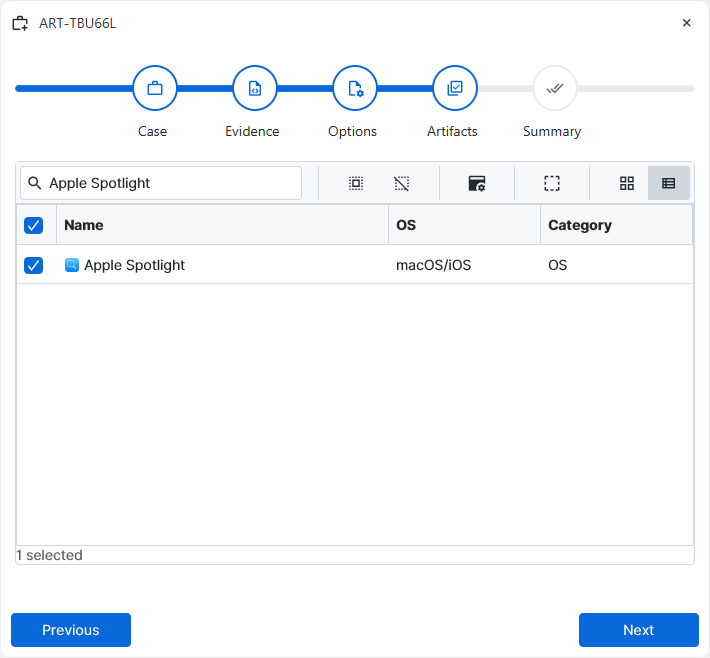
After you have created your case and added evidence for the
investigation, at the Artifact Selection phase, you can select Apple
Spotlight artifact parsers:
×
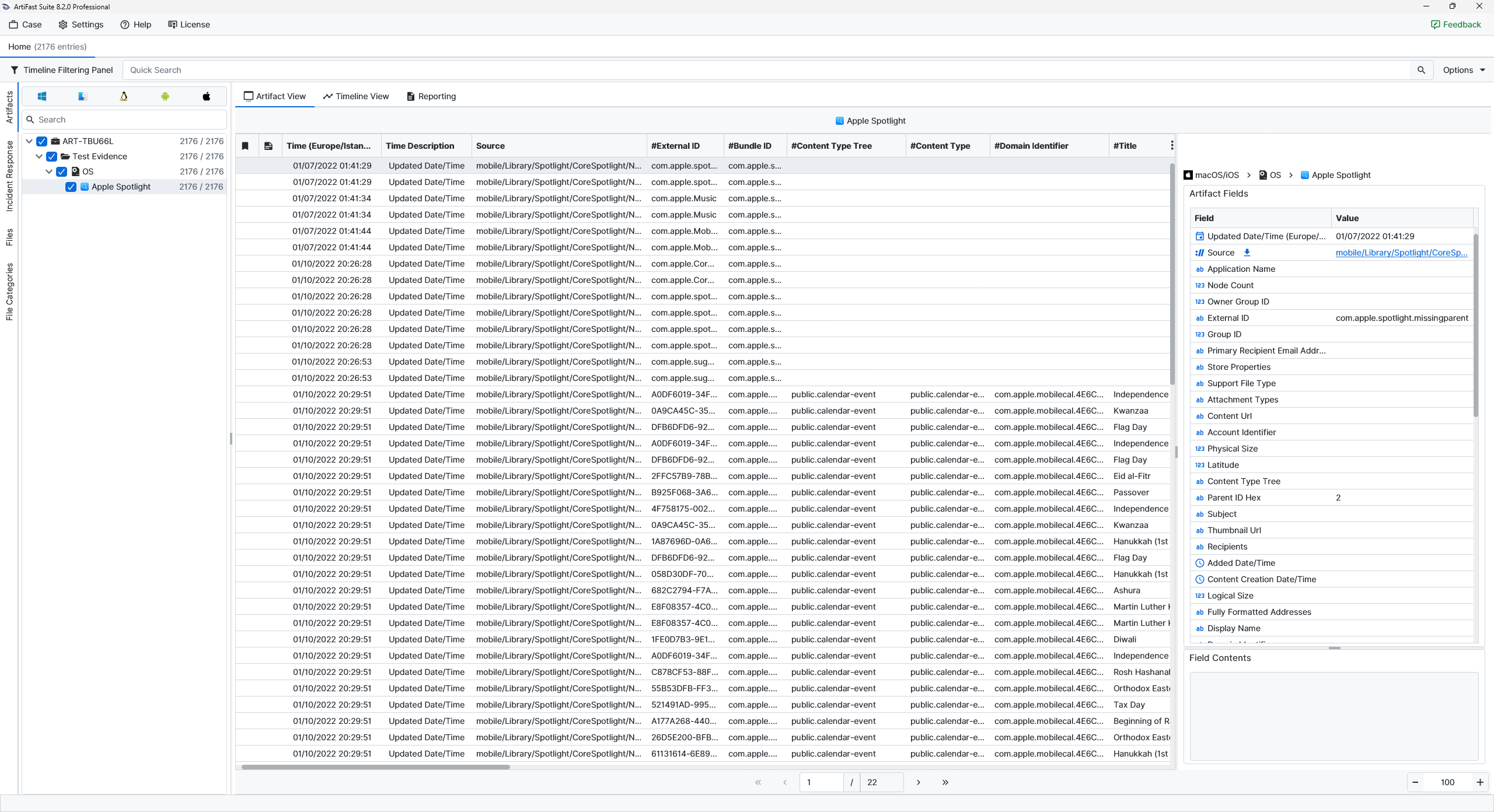
Once ArtiFast parsers plugins complete processing the artifact for analysis, it can be reviewed via “Artifact View” or “Timeline View,” with indexing, filtering, and searching capabilities. Below is a detailed description of Apple Spotlight artifacts in ArtiFast.
Apple Spotlight
- Updated Date/Time (Europe/Istanbul): The date and time at which the indexed Spotlight entry was last updated are recorded in this field and are displayed in the Europe/Istanbul time zone.
- Source: The database path from which the indexed entry was extracted is shown here. It is used to identify which Spotlight store contained the record.
- Application Name: The name of the application associated with the indexed item is recorded in this field.
- Node Count: The number of indexed nodes or related internal index elements associated with the record is shown here.
- Owner Group ID: The group identifier linked to the indexed item is shown here.
- External ID: An identifier assigned by the source application or service is shown here.
- Group ID: An internal grouping identifier used within the Spotlight index is recorded in this field.
- Primary Recipient Email Addresses: The main recipient email addresses associated with the indexed item are shown here.
- Store Properties: Additional indexed metadata stored as Spotlight properties are recorded in this field.
- Support File Type: The type of supporting or auxiliary file associated with the indexed entry is shown here.
- Attachment Types: The kinds of attachments linked to the indexed item are shown here. These values may indicate whether documents, images, or other attachment categories were associated with the content.
- Content URL: The URL associated with the indexed content is recorded in this field.
- Account Identifier: The identifier of the account associated with the indexed item is recorded in this field.
- Physical Size: The amount of physical storage occupied by the indexed item is shown here.
- Latitude: The latitude coordinate associated with the indexed content is shown here.
- Content Type Tree: The Uniform Type Identifier hierarchy or content classification tree of the indexed item is recorded in this field.
- Parent ID Hex: The parent-object identifier, represented in hexadecimal form, is recorded in this field.
- Subject: The subject value associated with the indexed content is recorded in this field when available.
- Thumbnail URL: A reference to a thumbnail image associated with the indexed item is shown here.
- Recipients: The recipients associated with the indexed item are recorded in this field.
- Added Date/Time: The time at which the item was first added to the Spotlight index is shown here.
- Content Creation Date/Time: The date and time at which the indexed content was originally created are recorded in this field.
- Logical Size: The logical size associated with the indexed item is recorded in this field.
- Fully Formatted Addresses: Complete address strings associated with the indexed item are shown here.
- Display Name: The user-facing name of the indexed item is shown here. It is often the most readable label for identifying the content.
- Domain Identifier: The domain value assigned by the source application is shown here. It is often used by apps to separate different groups or categories of indexed content.
- Named Location: A human-readable location name associated with the indexed item is recorded in this field.
- Phone Numbers: Phone numbers associated with the indexed item are recorded in this field.
- Last Used Date/Time: The date and time at which the indexed item was last used are recorded in this field.
- Storage Size: The storage size associated with the indexed item is recorded in this field.
- User Activity Type: The activity type associated with the indexed entry is recorded in this field, when the record was created from a user activity or handoff-related source.
- Mail Received Date/Time: The date and time at which associated mail content was received are recorded in this field, when applicable.
- Authors: The authors associated with the indexed item are recorded in this field.
- Account Handles: Account handle values associated with the indexed item are recorded in this field.
- Parent ID: The application bundle identifier responsible for the indexed item is shown here.
- Bundle ID: The bundle identifier of the application from which the indexed item originated is stored in this field.
- Longitude: The longitude value associated with the indexed item is recorded in this field when location metadata is present.
- Title: The title of the indexed content is recorded in this field.
- Attachment Names: The names of attachments associated with the indexed item are recorded in this field.
- Alternate Names: Alternate names associated with the indexed content are recorded in this field.
- ID Hex Reversed: An internal identifier represented in reversed hexadecimal form is recorded in this field.
- Store UUID: The UUID associated with the Spotlight store instance is recorded in this field.
- Recipient Email Addresses: Recipient email addresses associated with the indexed item are recorded in this field.
- ID: An internal identifier assigned to the indexed entry is recorded in this field.
- File Name: The file name associated with the indexed item is recorded in this field.
- Account Type: The type of account associated with the indexed content is recorded in this field.
- Content Type: The direct Uniform Type Identifier or content classification of the indexed item is recorded in this field.
- ID Hex: An internal identifier represented in hexadecimal form is recorded in this field.
- Author Email Address: The email address of the author associated with the indexed item is recorded in this field.
- Display Name With Extensions: The display name of the indexed item, including extensions where applicable, is recorded in this field.
- Postal Code: The postal code associated with the indexed item is recorded in this field when location metadata is present.
- Owner User ID: The identifier of the owning user associated with the indexed item is recorded in this field.
- Kind: A human-readable classification of the indexed content is recorded in this field.
- Persona ID: The persona identifier associated with the indexed content is recorded in this field.
- Snippet: A short indexed summary or preview text extracted from the content is recorded in this field.
- Content Modification Date/Time: The date and time at which the indexed content was last modified are recorded in this field.
- Account Updated Date/Time: The date and time at which the associated account information was last updated are recorded in this field.
For more information or suggestions please contact: ali.tora@forensafe.com
