Investigating Apple Screen Time
14/08/2026 Friday
Apple Screen Time is an Apple feature used to record and manage device
usage activity, application and website activity, pickups,
notifications, and usage limits. On iOS devices, Screen Time records may
preserve hourly usage summaries, category-based totals, counted item
activity, and timed item activity associated with applications,
websites, devices, and Apple account profiles.
Digital Forensics Value of Apple Screen Time
Apple Screen Time artifacts can provide useful context when device usage patterns and application activity need to be reviewed. Hourly usage records may help show when the device was actively used, while category totals can help identify broader activity types such as social networking, entertainment, productivity, or other Screen Time categories. Counted item records may preserve bundle identifiers, pickup counts, notification counts, and first pickup timestamps, which can support timeline reconstruction and help identify applications that drew user attention. Timed item records may preserve app or domain usage durations, category identifiers, and account or device identifiers. These records can be correlated with application artifacts, notifications, browser activity, location records, and system logs to support a clearer reconstruction of user behavior.
Location of Apple Screen Time
Apple Screen Time artifacts are commonly associated with the Remote
Management Screen Time store on iOS devices. The parsed records may be
associated with the following path:
/private/var/mobile/Library/Application
Support/com.apple.remotemanagementd/RMAdminStore-Local.sqlite
The Screen Time database may include hourly usage, category, counted
item, and timed item records. The exact availability of records can
differ depending on device version, Screen Time settings, synced account
state, Family Sharing configuration, and acquisition type.
Analyzing Apple Screen Time Artifacts with ArtiFast
This section will discuss how to use ArtiFast to extract Apple Screen
Time artifacts from iOS device files and what kind of digital forensics
insights can be gained from the artifacts.
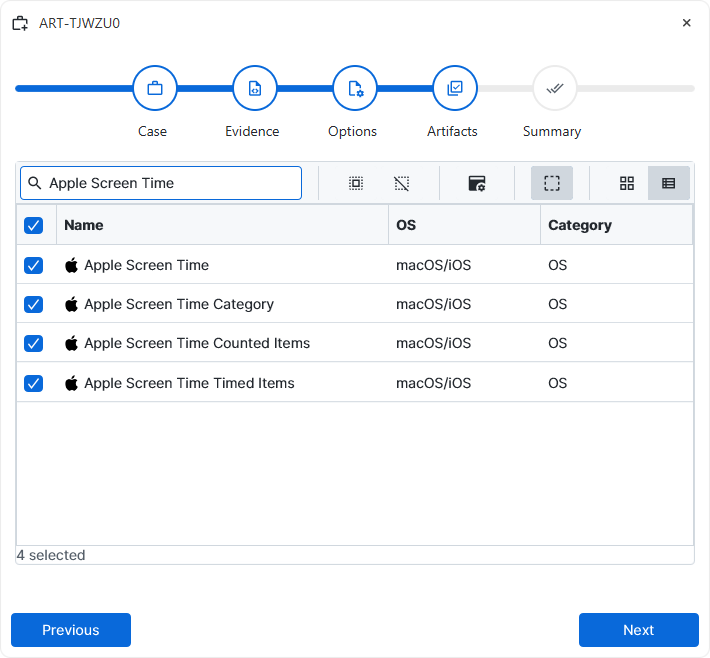
After a case has been created and evidence has been added for the
investigation, at the Artifact Selection phase, the Apple Screen Time
artifact parsers can be selected:
×
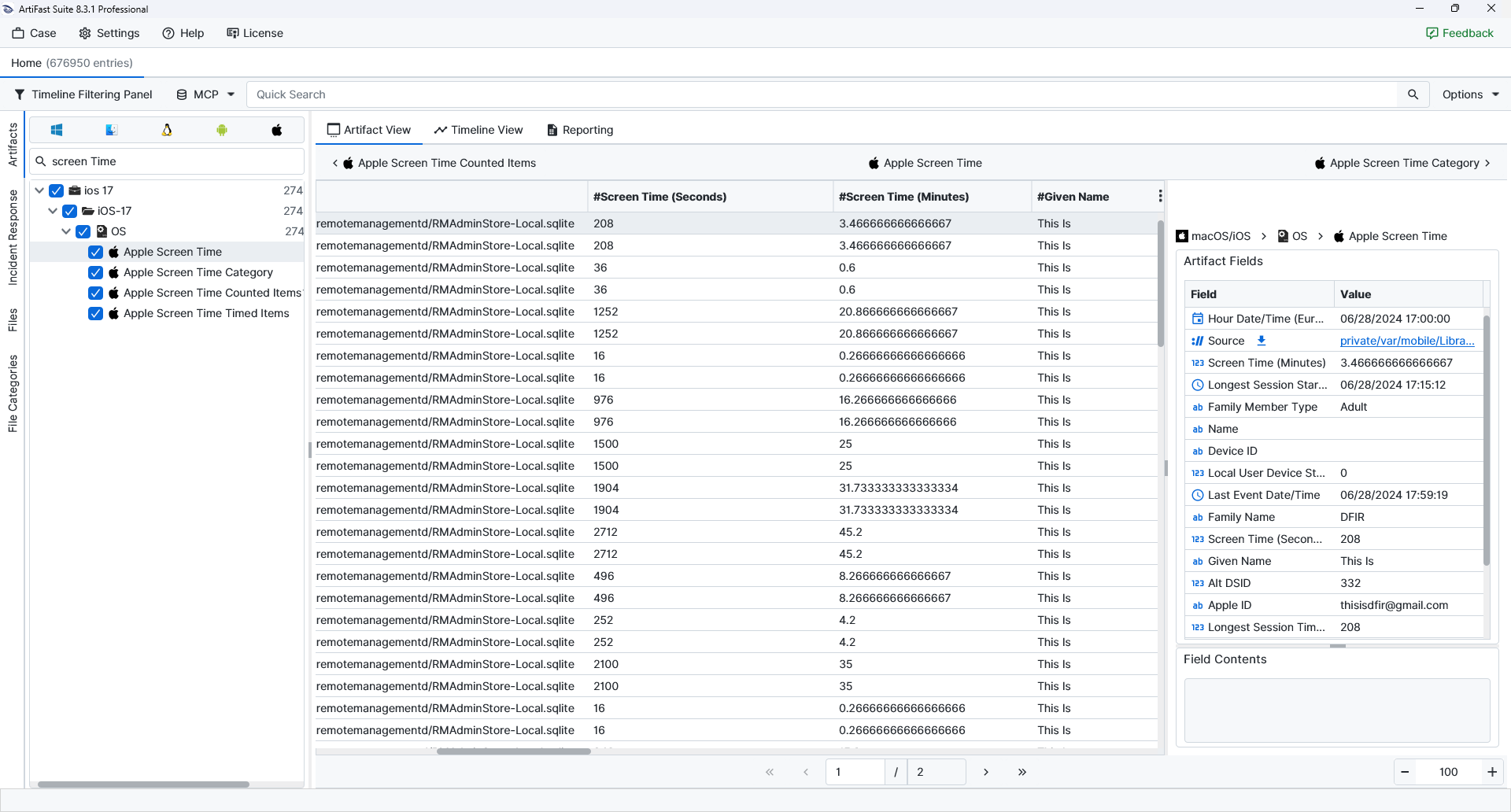
Once the ArtiFast parser plugins complete processing the artifacts for analysis, they can be reviewed via Artifact View or Timeline View, with indexing, filtering, and searching capabilities. Below is a detailed description of Apple Screen Time artifacts in ArtiFast.
Apple Screen Time
- Source: Points to the Screen Time database from which the record was parsed.
- Family Member Type: Identifies the Screen Time family member classification associated with the record.
- Hour Date/Time: Records the hourly time bucket associated with the Screen Time record.
- Screen Time (Seconds): Stores the total screen time duration for the hourly record in seconds.
- Apple ID: Stores the Apple account identifier associated with the Screen Time profile when available.
- Screen Time (Minutes): Stores the same hourly screen time duration converted into minutes.
- DSID: Records the Apple account DSID linked to the Screen Time record.
- Given Name: Stores the given name associated with the Screen Time account or family member.
- Family Name: Stores the family name associated with the Screen Time account or family member.
- Platform: Identifies the Apple platform associated with the Screen Time record.
- Alt DSID: Records the alternate DSID linked to the Apple account profile when available.
- Name: Stores the display name associated with the Screen Time profile or device record.
- Device ID: Identifies the device associated with the Screen Time record.
- Local User Device State: Preserves the local device state value associated with the Screen Time record.
- Longest Session Start Date/Time: Records when the longest usage session in the hourly period started.
- Longest Session End Date/Time: Records when the longest usage session in the hourly period ended.
- Last Event Date/Time: Records the last Screen Time event timestamp associated with the hourly record.
- Longest Session Time (Seconds): Stores the duration of the longest usage session in seconds.
- Longest Session Time (Minutes): Stores the duration of the longest usage session converted into minutes.
Apple Screen Time Category
- Source: Points to the Screen Time database from which the record was parsed.
- Category ID: Identifies the Screen Time category associated with the usage record.
- Family Member Type: Identifies the Screen Time family member classification associated with the record.
- Hour Date/Time: Records the hourly time bucket associated with the Screen Time record.
- Apple ID: Stores the Apple account identifier associated with the Screen Time profile when available.
- Category Total Time (Seconds): Stores the total usage duration for the category in seconds.
- Category Total Time (Minutes): Stores the category usage duration converted into minutes.
- DSID: Records the Apple account DSID linked to the Screen Time record.
- Family Name: Stores the family name associated with the Screen Time account or family member.
- Given Name: Stores the given name associated with the Screen Time account or family member.
- Platform: Identifies the Apple platform associated with the Screen Time record.
- Alt DSID: Records the alternate DSID linked to the Apple account profile when available.
- Name: Stores the display name associated with the Screen Time profile or device record.
- Device ID: Identifies the device associated with the Screen Time record.
- Local User Device State: Preserves the local device state value associated with the Screen Time record.
Apple Screen Time Counted Items
- Source: Points to the Screen Time database from which the record was parsed.
- Family Member Type: Identifies the Screen Time family member classification associated with the record.
- Hour Date/Time: Records the hourly time bucket associated with the Screen Time record.
- ZUSAGECOUNTEDITEM Table ID: Records the internal table identifier assigned to the counted item entry.
- Apple ID: Stores the Apple account identifier associated with the Screen Time profile when available.
- Bundle ID: Identifies the application bundle associated with the Screen Time item when available.
- DSID: Records the Apple account DSID linked to the Screen Time record.
- First Pickup Date/Time: Records the first pickup timestamp associated with the counted item.
- Number of Notifications: Stores the number of notifications associated with the counted item.
- Number of Pickups: Stores the number of device pickups associated with the counted item.
- Number of Pickups Without App Usage: Stores pickup activity where application usage was not recorded afterward.
- Family Name: Stores the family name associated with the Screen Time account or family member.
- Given Name: Stores the given name associated with the Screen Time account or family member.
- Platform: Identifies the Apple platform associated with the Screen Time record.
- Alt DSID: Records the alternate DSID linked to the Apple account profile when available.
- Name: Stores the display name associated with the Screen Time profile or device record.
- Device ID: Identifies the device associated with the Screen Time record.
- Local User Device State: Preserves the local device state value associated with the Screen Time record.
Apple Screen Time Timed Items
- Source: Points to the Screen Time database from which the record was parsed.
- Family Member Type: Identifies the Screen Time family member classification associated with the record.
- Hour Date/Time: Records the hourly time bucket associated with the Screen Time record.
- ZUSAGETIMEDITEM Table ID: Records the internal table identifier assigned to the timed item entry.
- Apple ID: Stores the Apple account identifier associated with the Screen Time profile when available.
- Bundle ID: Identifies the application bundle associated with the Screen Time item when available.
- Category ID: Identifies the Screen Time category associated with the usage record.
- DSID: Records the Apple account DSID linked to the Screen Time record.
- Domain: Records the website or domain associated with the timed item when available.
- App Usage Time Item (Seconds): Stores the application or domain usage duration in seconds.
- Platform: Identifies the Apple platform associated with the Screen Time record.
- Alt DSID: Records the alternate DSID linked to the Apple account profile when available.
- App Usage Time Item (Minutes): Stores the application or domain usage duration converted into minutes.
- Number of Pickups Without App Usage: Stores pickup activity where application usage was not recorded afterward.
- Given Name: Stores the given name associated with the Screen Time account or family member.
- Family Name: Stores the family name associated with the Screen Time account or family member.
- Name: Stores the display name associated with the Screen Time profile or device record.
- Device ID: Identifies the device associated with the Screen Time record.
- Local User Device State: Preserves the local device state value associated with the Screen Time record.
For more information or suggestions please contact: enes.turan@forensafe.com
