Android Any.do
20/03/2026 Friday
Any.do is a task management application on Android that allows users to
create and organize tasks, set reminders, and manage daily activities
with optional features like calendar integration and list sharing. It
also supports cloud synchronization, but some functionality is limited
to paid tiers. Comparable apps include Todoist, Microsoft To Do,
TickTick, and Google Keep, which offer similar core features.
Digital Forensics Values of Android Any.do
The Any.do application on Android can serve as a useful source of
artifacts in digital forensic investigations, as it stores data related
to tasks, alerts, and user accounts. Alert information can help
reconstruct timelines of planned user activities, while account data
such as user identity, email, timezone, and account timestamps supports
user attribution. Additional details like task completion metrics and
time tracking can offer insight into user behavior, enabling
investigators to identify patterns and better understand how the
application was used over time.
Location of Android Any.do
Android Any.do artifact can be found at the following location:
/data/user/0/com.anydo/databases/data
Analyzing Android Any.do Artifacts with ArtiFast
This section will discuss how to use ArtiFast to extract Android Any.do
artifacts from Android machines’ files and what kind of digital
forensics insights we can gain from the artifact.
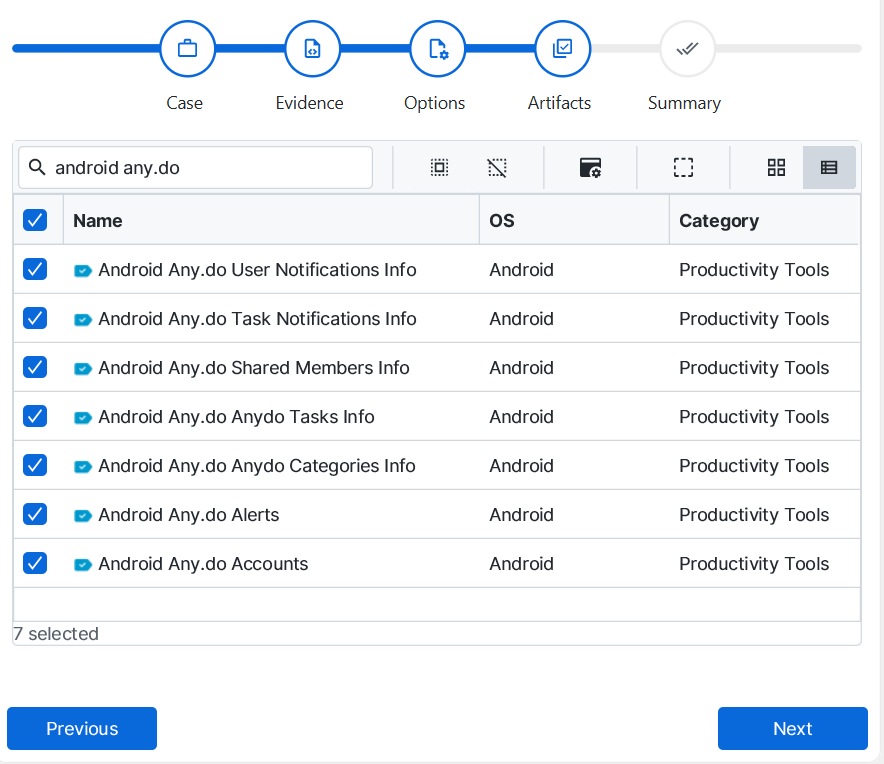
After you have created your case and added evidence for the
investigation, at the Artifact Selection phase, you can select Android
Any.do artifact parser:
×
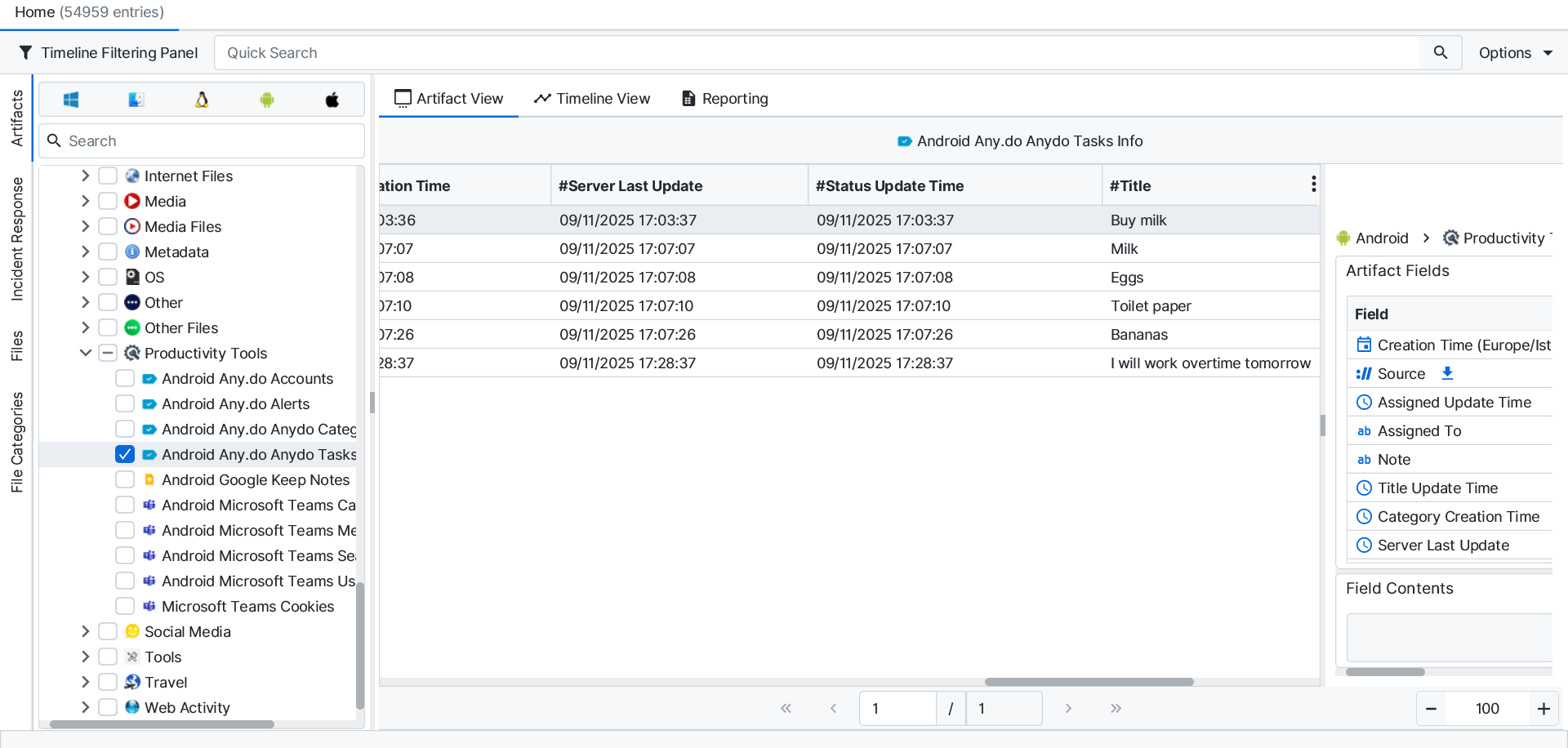
Once ArtiFast parsers plugins complete processing the artifact for analysis, it can be reviewed via “Artifact View” or “Timeline View,” with indexing, filtering, and searching capabilities. Below is a detailed description of Android Any.do artifacts in ArtiFast.
Android Any.do Alerts
- Alert ID: Unique identifier for the alert record in the system.
- Task ID: Unique identifier of the task associated with the alert.
- Task Title: Title or name of the task linked to the alert.
- Task Hash: Hashed identifier used internally to uniquely reference the task.
- Alert Type Code: Internal code representing the type of alert configuration.
- Alert Type: Human-readable description of the alert type.
- Next Occurrence Date/Time: The next scheduled date and time when the alert will trigger.
- Custom Alert Date/Time: Custom date and time explicitly set for the alert to trigger.
- Offset (Milliseconds): Time offset in milliseconds used to trigger the alert relative to another event.
- Offset Duration: Formatted representation of the alert offset expressed in minutes.
- Is Recurring: Indicates whether the alert is configured to repeat over time.
- Repeat Interval Code: Internal code defining how frequently the alert repeats.
- Repeat Interval: Human-readable description of the alert recurrence frequency.
- Repeat Month Type: Specifies the monthly recurrence pattern.
- Repeat Week Days: Encoded representation of the days of the week on which the alert repeats.
- Has Specific Weekdays: Indicates whether the alert is restricted to specific days of the week.
- Repeat Start Date/Time: Date and time when the recurring alert schedule begins.
- Repeat End Date/Time: Date and time when the recurring alert schedule ends.
- Repeat Date/Time: Time of day at which the recurring alert is scheduled to trigger.
- Repeat End Type Code: Internal code defining how the recurring alert terminates.
- Repeat End Type: Human-readable description of how the recurring alert ends.
- Total Occurrences: Number of times the alert is scheduled to occur.
- Occurrences Description: Human-readable interpretation of the total number of alert occurrences.
Android Any.do Accounts
- User ID: Unique identifier of the user in the system.
- User Name: Full name of the user.
- User Email: Email address associated with the user account.
- User Timezone: Timezone configured for the user.
- Account Type: Type of user account such as Premium or Free.
- Is Premium: Indicates whether the user has a premium subscription.
- Is Reverse Trial: Indicates whether the user is in a reverse trial period.
- Account Created Date/Time: Date and time when the user account was created.
- Last Updated Date/Time: Date and time when the user account was last updated.
- Total Completed Tasks: Total number of tasks completed by the user.
- Has Unread Notifications: Indicates whether the user has unread notifications.
- Onboarding Pending: Indicates whether the onboarding process is incomplete.
- First Day of Week Code: Numeric code representing the first day of the week setting.
- First Day of Week: Name of the first day of the week configured by the user.
- My Day Configuration: Configuration settings for the My Day feature.
- Profile Picture URL: URL of the user’s profile picture.
- Active Time Tracker Card ID: Identifier of the card currently being tracked for time.
- Active Time Tracker Start Date/Time: Start time of the currently active time tracking session.
- Active Time Tracker Minutes: Total minutes elapsed since the active time tracker started.
- Needs Sync: Indicates whether the user data requires synchronization.
- Has Grocery List Data: Indicates whether grocery list data exists for the user.
- Has Spaces Data: Indicates whether spaces data exists for the user.
Android Any.do User Notifications Info
- Creation Date: Creation date of the notification record.
- Data Hash: Hashed value representing the notification data.
- Global ID: Global unique identifier for the notification.
- ID: Unique identifier of the notification.
- Is Deleted: Indicates whether the notification has been deleted.
- Is Read: Indicates whether the notification has been read.
- Is Viewed: Indicates whether the notification has been viewed.
- Parameters Category ID: Identifier of the associated category.
- Parameters Category Name: Name of the associated category.
- Parameters Due Date: Due date associated with the notification.
- Server Last Update: Date and time when the notification was last updated on the server.
- User Email: Email address associated with the user.
- User Image: URL or reference to the user’s profile image.
- User Name: Name of the user associated with the notification.
Android Any.do Task Notifications Info
- Creation Date: Creation date of the task notification record.
- Data Hash: Hashed value representing the task notification data.
- Global ID: Global unique identifier for the task notification.
- ID: Unique identifier of the task notification.
- Parameters New Note: Newly added note content associated with the task.
- Parameters Due Date: Due date associated with the task notification.
- Server Last Update: Date and time when the task notification was last updated on the server.
- Task ID: Unique identifier of the related task.
- User Email: Email address associated with the user.
- User Image: URL or reference to the user’s profile image.
- User Name: Name of the user associated with the task notification.
Android Any.do Shared Members Info
- Email: Email address of the shared member.
- ID: Unique identifier of the shared member.
- Image Url: URL of the shared member’s profile image.
- Invited By Email: Email address of the user who sent the invitation.
- Invited By Name: Name of the user who sent the invitation.
- Name: Name of the shared member.
- Personal Message: Optional message included with the invitation.
- Stats: Statistical information related to the shared member.
- Task ID: Identifier of the task associated with the shared member.
- Via: Source or method through which the member was invited.
Android Any.do Tasks Info
- Creation Time: Date and time when the task was created.
- Assigned Update Time: Date and time when the task assignment was last updated.
- Assigned To: Identifier or name of the user to whom the task is assigned.
- Category: Category or list to which the task belongs.
- Category Creation Time: Date and time when the category was created.
- Due Time: Date and time when the task is due.
- Due Creation Time: Date and time when the due date was set.
- Task Modification Time: Date and time when the task was last modified.
- Note: Additional notes or description associated with the task.
- Note Creation Time: Date and time when the note was created.
- Server Last Update: Date and time when the task was last updated on the server.
- Status Update Time: Date and time when the task status was last changed.
- Tag: Tag or label assigned to the task.
- Title: Title or name of the task.
- Title Update Time: Date and time when the task title was last updated.
Android Any.do Categories Info
- Server Last Update Time: Date and time when the category was last updated on the server.
- Active Group Method: Method used to group or organize tasks within the category.
- ID: Unique identifier of the category.
- Is Default: Indicates whether this is a default system category.
- Is Deleted: Indicates whether the category has been deleted.
- Is Grocery List: Indicates whether the category is used as a grocery list.
- Grocery List Time: Timestamp related to grocery list activity or creation.
- Task Type: Type of tasks associated with this category.
- Task Finishes Submitting Time: Date and time when task submission within the category was completed.
- Is Shared: Indicates whether the category is shared with other users.
For more information or suggestions please contact: kalthoum.karkazan@forensafe.com
